Remove from registry
he following registry keys are added in order to load the service after reboot:
– [HKLM\SYSTEM\CurrentControlSet\Enum\Root\LEGACY_CLIPBOARD]
• "NextInstance"=dword:00000001
– [HKLM\SYSTEM\CurrentControlSet\Services\ClipBoard\Security]
• "Security"=%hex values%
– [HKLM\SYSTEM\CurrentControlSet\Enum\Root\LEGACY_CLIPBOARD\0000]
• "Service"="ClipBoard"
"Legacy"=dword:00000001
"ConfigFlags"=dword:00000000
"Class"="LegacyDriver"
"ClassGUID"="{8ECC055D-047F-11D1-A537-0000F8753ED1}"
"DeviceDesc"="ClipBoard"
– [HKLM\SYSTEM\CurrentControlSet\Enum\Root\LEGACY_CLIPBOARD\0000\
Control]
• "*NewlyCreated*"=dword:00000000
"ActiveService"="ClipBoard"
– [HKLM\SYSTEM\CurrentControlSet\Services\ClipBoard]
• "Type"=dword:00000010
"Start"=dword:00000002
"ErrorControl"=dword:00000001
"ImagePath"="%SYSDIR%\LoadPlugin.exe"
"DisplayName"="ClipBoard"
"ObjectName"="LocalSystem"
– [HKLM\SYSTEM\CurrentControlSet\Services\ClipBoard\Enum]
• "0"="Root\\LEGACY_CLIPBOARD\\0000"
"Count"=dword:00000001
"NextInstance"=dword:00000001
Deleted files
– %SYSDIR%\_LoadPlugin.exe Further investigation pointed out that this file is malware, too. Detected as: TR/Delphi.Downloader.Gen
– %SYSDIR%\LoadPlugin.exe Furthermore it gets executed after it was fully created. Further investigation pointed out that this file is malware, too. Detected as: TR/Delphi.Downloader.Gen
Saturday, March 17, 2007
Hacked By Godzilla
Hacked By Godzilla
เป็นไวรัส ตัวใหม่ที่กำลังระบาดอยู่ จัดเป็น spyware ที่ก่อกวนการทำงานมากกว่าจะทำลายข้อมูล โดยจะเป็นการติดผ่าน Handy Drive และ Floppy Disk เท่านั้น
ลักษณะอาการ
1.เครื่องจะไม่สามารถ Double Click เปิดไดร์ฟต่างๆได้ แต่จะคลิกเมาส์ขวาเพื่อเปิดไดร์ฟโดยเลือกเมนู Open หรือExplore
2.มีข้อความปรากฏบน Title Bar ของ Internet Explorer ว่า “Hacked By Godzilla”
วิธีการแก้ไขเมื่อติดไวรัส Godzilla
1.Double Click ไอคอน My Computer ที่ Desktop เลือกเมนู Tools --> Folder Options
2.ปรากฏไดอะล็อก Folder Options คลิกแท็บ View
1)คลิกเลือก Show Hidden files and folders
2)เอาเครื่องหมาย / ในช่องสี่เหลี่ยมหน้า Hide extention… และ Hide protected operating system file ออก
3)คลิก OK
3.กดปุ่ม Ctrl+Alt+Delete ที่คีย์บอร์ด
4.ปรากฏไดอะล็อกบ็อก Windows Task Manager คลิกเลือกแท็บ Processes
1)คลิกเลือกเมนู Image Name (เพื่อ sort File)
2)คลิกเลือกไฟล์ wscript.exe ( ทีละตัว )
3)คลิกปุ่ม End Process
5.เปิด ไดร์ฟ ( โดยคลิกเม้าส์ขวาเลือก Explore ห้าม Double Click ไดร์ฟ ) ทำการลบไฟล์ autorun.inf และ MS32DLL.dll.vbs ออก (โดยกด Shift+Delete ) ทุกไดร์ฟที่มีอยู่ในเครื่องคอมพิวเตอร์ซึ่งรวมทั้ง Handy Drive และ Floppy disk ด้วย
6.เปิดโฟลเดอร์ C:WINDOWS เพื่อลบไฟล์ MS32DLL.dll.vbs ออก (โดยกด Shift+Delete )
7.ไปที่ปุ่ม Start-->Run ปรากฏไดอะล็อกบ็อก Run พิมพ์คำสั่ง regedit กดปุ่ม OK
ปรากฏไดอะล็อกบ็อก Registry Edit
8.คลิกเลือก HKEY_LOCAL_MACHINE --> Software --> Current Version --> Run เพื่อลบไฟล์ MS32DLL (โดยการกดปุ่ม Delete ที่คีย์บอร์ด )
9. คลิกเลือก HKEY_CURRENT_USER --> Software --> Microsoft --> Internet Explorer --> Main เพื่อลบไฟล์ที่ Window Title “Hacked by Godzilla” ออก (โดยการกดปุ่ม Delete ที่คีย์บอร์ด )
10.คลิกปุ่ม Start --> Run ปรากฏไดอะล็อกบ็อก Run พิมพ์คำสั่ง gpedit.msc กดปุ่ม OK
ปรากฏไดอะล็อกบ็อก Group Policy
11.คลิกเลือก User Configuration --> Administrative Templates --> System --> Double Click ไฟล์ Turn Off Autoplay ปรากกฎไดอะล็อกบ็อก Turn Off Autoplay Properties
1)คลิกเลือก Enabled
2)คลิกเลือก All drives
3)คลิก OK
เพื่อ ป้องกันการเปิดไดร์ฟอัตโนมัติในกรณีที่นำแผ่นซีดี หรือ Handy Drive มาใช้งานซึ่งเป็นช่องทางที่จะทำให้เกิดการติดไวรัสได ้ง่ายขึ้น
12.คลิกปุ่ม Start --> Run ปรากฏไดอะล็อกบ็อก Run พิมพ์คำสั่ง msconfig กดปุ่ม OK
ปรากฏไดอะล็อกบ็อก System Configuration Utility คลิกแท็บ Startup
1)เอาเครื่องหมาย / ในช่องสี่เหลี่ยมหน้าไฟล์ MS32DLL ออก
2)คลิกปุ่ม Apply
3)คลิกปุ่ม OK (หรือ Close)
จะปรากฏไดอะล็อกบ็อก System Configuration เลือก Exit Without Restart
13.Double Click ไอคอน Mycomputer ที่ Desktop เลือกเมนู Tools --> Folder Options
14.ปรากฏไดอะล็อก Folder Options คลิกแท็บ View
1)คลิก / ในช่องสี่เหลี่ยมหน้า Hide extention… และ Hide protected operating system file
2)คลิก OK
15. Click เม้าส์ขวาที่ไอคอน Recycle bin เพื่อเรียก Shortcut Menu เลือกคำสั่ง Empty Recycle bin เพื่อยืนยันการลบไฟล์ไวรัสออกจากเครื่องคอมพิวเตอร์อ ีกครั้ง
credit : http://www.pantip.com/tech/article/article.php?id=170
เป็นไวรัส ตัวใหม่ที่กำลังระบาดอยู่ จัดเป็น spyware ที่ก่อกวนการทำงานมากกว่าจะทำลายข้อมูล โดยจะเป็นการติดผ่าน Handy Drive และ Floppy Disk เท่านั้น
ลักษณะอาการ
1.เครื่องจะไม่สามารถ Double Click เปิดไดร์ฟต่างๆได้ แต่จะคลิกเมาส์ขวาเพื่อเปิดไดร์ฟโดยเลือกเมนู Open หรือExplore
2.มีข้อความปรากฏบน Title Bar ของ Internet Explorer ว่า “Hacked By Godzilla”
วิธีการแก้ไขเมื่อติดไวรัส Godzilla
1.Double Click ไอคอน My Computer ที่ Desktop เลือกเมนู Tools --> Folder Options
2.ปรากฏไดอะล็อก Folder Options คลิกแท็บ View
1)คลิกเลือก Show Hidden files and folders
2)เอาเครื่องหมาย / ในช่องสี่เหลี่ยมหน้า Hide extention… และ Hide protected operating system file ออก
3)คลิก OK
3.กดปุ่ม Ctrl+Alt+Delete ที่คีย์บอร์ด
4.ปรากฏไดอะล็อกบ็อก Windows Task Manager คลิกเลือกแท็บ Processes
1)คลิกเลือกเมนู Image Name (เพื่อ sort File)
2)คลิกเลือกไฟล์ wscript.exe ( ทีละตัว )
3)คลิกปุ่ม End Process
5.เปิด ไดร์ฟ ( โดยคลิกเม้าส์ขวาเลือก Explore ห้าม Double Click ไดร์ฟ ) ทำการลบไฟล์ autorun.inf และ MS32DLL.dll.vbs ออก (โดยกด Shift+Delete ) ทุกไดร์ฟที่มีอยู่ในเครื่องคอมพิวเตอร์ซึ่งรวมทั้ง Handy Drive และ Floppy disk ด้วย
6.เปิดโฟลเดอร์ C:WINDOWS เพื่อลบไฟล์ MS32DLL.dll.vbs ออก (โดยกด Shift+Delete )
7.ไปที่ปุ่ม Start-->Run ปรากฏไดอะล็อกบ็อก Run พิมพ์คำสั่ง regedit กดปุ่ม OK
ปรากฏไดอะล็อกบ็อก Registry Edit
8.คลิกเลือก HKEY_LOCAL_MACHINE --> Software --> Current Version --> Run เพื่อลบไฟล์ MS32DLL (โดยการกดปุ่ม Delete ที่คีย์บอร์ด )
9. คลิกเลือก HKEY_CURRENT_USER --> Software --> Microsoft --> Internet Explorer --> Main เพื่อลบไฟล์ที่ Window Title “Hacked by Godzilla” ออก (โดยการกดปุ่ม Delete ที่คีย์บอร์ด )
10.คลิกปุ่ม Start --> Run ปรากฏไดอะล็อกบ็อก Run พิมพ์คำสั่ง gpedit.msc กดปุ่ม OK
ปรากฏไดอะล็อกบ็อก Group Policy
11.คลิกเลือก User Configuration --> Administrative Templates --> System --> Double Click ไฟล์ Turn Off Autoplay ปรากกฎไดอะล็อกบ็อก Turn Off Autoplay Properties
1)คลิกเลือก Enabled
2)คลิกเลือก All drives
3)คลิก OK
เพื่อ ป้องกันการเปิดไดร์ฟอัตโนมัติในกรณีที่นำแผ่นซีดี หรือ Handy Drive มาใช้งานซึ่งเป็นช่องทางที่จะทำให้เกิดการติดไวรัสได ้ง่ายขึ้น
12.คลิกปุ่ม Start --> Run ปรากฏไดอะล็อกบ็อก Run พิมพ์คำสั่ง msconfig กดปุ่ม OK
ปรากฏไดอะล็อกบ็อก System Configuration Utility คลิกแท็บ Startup
1)เอาเครื่องหมาย / ในช่องสี่เหลี่ยมหน้าไฟล์ MS32DLL ออก
2)คลิกปุ่ม Apply
3)คลิกปุ่ม OK (หรือ Close)
จะปรากฏไดอะล็อกบ็อก System Configuration เลือก Exit Without Restart
13.Double Click ไอคอน Mycomputer ที่ Desktop เลือกเมนู Tools --> Folder Options
14.ปรากฏไดอะล็อก Folder Options คลิกแท็บ View
1)คลิก / ในช่องสี่เหลี่ยมหน้า Hide extention… และ Hide protected operating system file
2)คลิก OK
15. Click เม้าส์ขวาที่ไอคอน Recycle bin เพื่อเรียก Shortcut Menu เลือกคำสั่ง Empty Recycle bin เพื่อยืนยันการลบไฟล์ไวรัสออกจากเครื่องคอมพิวเตอร์อ ีกครั้ง
credit : http://www.pantip.com/tech/article/article.php?id=170

SpywareQuake & SpyFalcon Removal Procedure
First, make sure you have followed the steps in this link: How to view hidden, system files & folders!
NOTES:
NOTES:
- Even if you do not find some (or all) of the files mentioned or you do not see SpywareQuake (or SpyFalcon....etc) in Add/Remove programs or the folder for it, just continue with ALL steps thru to the end.
- In the below instructions the %System32% text is an abbreviation for your either c:\Windows\System32 or c:\Winnt\System32 It depends on how/where you installed your Windows OS. Thus %System32%\stickrep.dll means either C:\Windows\System32\stickrep.dll or C:\Winnt\System32\stickrep.dll
- Some of the items being deleted by this procedure are not Smitfraud family related but the fit into the area for removal.
- Now download smitRem.exe written by noahdfear and save the file to your Desktop.
- Double click on the smitRem.exe file and click the Start button to extract it to its own folder named SmitRem on the desktop.
(this should be the default selection). Do not run anything else related to the program yet! - Now you will need to print or save these instructions locally (to a text file on your Desktop) for later reference. This is necessary
because you must not have any browers open and must not connect to the internet while following the below steps. - Now disconnect your cable to the internet (physically unplug it).
- After saving the instructions, reboot into Safe mode
- Now once in safe mode, goto Add/Remove programs and uninstall Spyware Quake and/or SpyFalcon (if they are found).
- Also while in Add/Remove programs look for and uninstall any of the below if found
- Internet Explorer Security Plugin 2006
- Internet Security Add-On
- PCODEC 6.0
- Now double-click on the fixquake.reg file on your desktop (or locate it with Windows Explorer and double click on it if not saved to
the Desktop) and when it prompts to Add in to the registry, say yes. - Run Windows Explorer by right clicking Start & Select Explore
- Navigate to your %System32% folder C:\Windows\system32 )or C:\Winnt\system32 depending on how/which OS you have installed.)
- Look for the following files based upon where you have Windows installed:
- %System32%\__delete_on_reboot__stickrep.dll
- %System32%\acvgxw.dll
- %System32%\adobepnl.dll
- %System32%\asxbbx.dll
- %System32%\bolnyz.dll
- %System32%\cfgmngr32.dll << color="red">DO NOT DELETE cfgmgr32.dll (notice the missing 'n')
- %System32%\dnefhw.dll
- %System32%\dvdcap.dll
- %System32%\dxmpp.dll
- %System32%\erxbx.dll
- %System32%\fyhhxw.dll
- %System32%\ginuerep.dll
- %System32%\guxxa.dll
- %System32%\higjxe.dll
- %System32%\htey.dll
- %System32%\hvcycg.dll
- %System32%\hvnwm.dll
- %System32%\hzclqhc.dll
- %System32%\icima.dll
- %System32%\iqzv.dll
- %System32%\imfdfcj.dll
- %System32%\jevtxpg.dll
- %System32%\kkqfb.dll
- %System32%\lwpfwjb.dll
- %System32%\oerucu.dll
- %System32%\ofcukiz.dll
- %System32%\oqipt.dll
- %System32%\ornzq.dll
- %System32%\oybgrql.dll
- %System32%\reglogs.dll
- %System32%\rmzdzx.dll
- %System32%\sbnudh.dll
- %System32%\sivudro.dll
- %System32%\stickrep.dll
- %System32%\suprox.dll
- %System32%\tnvocyn.dll
- %System32%\twain32.dll
- %System32%\vhywj.dll
- %System32%\viruxz.dll
- %System32%\vjeojhvro.dll
- %System32%\ucbrrt.dll
- %System32%\ulztc.dll
- %System32%\viwpzla.dll
- %System32%\vpxnk.dll
- %System32%\wfkduei.dll
- %System32%\wschtm35.dll
- %System32%\xenadot.dll
- %System32%\xuefh.dll
- %System32%\yfysupa.dll
- %System32%\yhbdupd.dll
- %System32%\yvvdj.dll
- %System32%\ywbicim.dll
- %System32%\zlara.dll
When you locate the files, right click on them and select Rename. Change the dll extension to DDD. For example: rename xenadot.dll to xenadot.DDD We will fully delete the files later.
- Now open the smitRem folder on your Deskop, double click on it to access the folder, then double click the RunThis.bat file to start
the tool. Follow the prompts on screen. Wait for the tool to complete and disk cleanup to finish. If you cannot get RunThis
.bat to work in safe mode, REBOOT into normal mode (with no internet connection) and repeat the above step from the point of booting in safe
mode. - The tool will create a log named smitfiles.txt in the root of the drive that you ran the batch file on, eg;
Local Disk C: or partition where your operating system is installed. Upload this file later after reboot. - Now reboot your system into normal mode.
- Now after reboot relocate the DLL files we renamed with a DDD extension in the above step and delete them. If you have a
problem deleting these files, try rebooting one more time into safe mode and attempt another deletion. If it still does not delete, make sure you tell us later.
- C:\Program Files\AdwareSheriff
- C:\Program Files\eMedia Codec
- C:\Program Files\IntCodec
- C:\Program Files\Media-Codec
- C:\Program Files\MediaCodec
- C:\Program Files\MMediaCodec
- C:\Program Files\Spyware Quake
- C:\Program Files\SpywareQuake.com
- C:\Program Files\SpyQuake2.com
- C:\Program Files\SpyFalcon
- C:\Program Files\TitanShield Antispyware
- C:\Program Files\Trust Cleaner
- C:\Windows\System\1024 (or C:\Winnt\System\1024 )
- C:\Windows\gxxxxxxx.dll <--- where xxxxxxx is any number of random numbers. There could be many of these files.
- %System32%\1024
- %System32%\a.exe
- %System32%\appmagr.dll
- %System32%\asxbbx.dll
- %System32%\autodisc32.dll <--- this is TX 4 BrowserAd adware
- %System32%\atmclk.exe
- %System32%\barseek.dll
- %System32%\biasfardihuy.dll
- %System32%\birdasfihuy32.dll
- %System32%\dcom_14.dll
- %System32%\dcom_15.dll
- %System32%\dcom_20.dll
- %System32%\dcom_21.dll
- %System32%\dcomcfg.exe
- %System32%\dfrgsrv.exe
- %System32%\dnefhw.dll
- %System32%\dxole32.exe
- %System32%\dxvwpwks.exe
- %System32%\dxvwbdds.exe
- %System32%\ekvrlfzz.exe
- %System32%\ishost.exe
- %System32%\ismini.exe
- %System32%\ismon.exe
- %System32%\isnotify.exe
- %System32%\issearch.exe
- %System32%\ixt0.dll
- %System32%\ixt1.dll
- %System32%\hp???.tmp ( where ??? is any 3 random characters
- %System32%\hp????.tmp ( where ???? is any 4 random characters)
- %System32%\ld??? .tmp ( where ??? is any 3 random characters)
- %System32%\ld???? .tmp ( where ???? is any 4 random characters)
- %System32%\main.exe
- %System32%\mssearchnet.exe
- %System32%\msvol.tlb
- %System32%\ncompat.tlb
- %System32%\nvctrl.exe
- %System32%\0mcamcap.exe
- %System32%\ot.ico
- %System32%\regperf.exe
- %System32%\runsrv32.dll
- %System32%\runsrv32.exe
- %System32%\shdocvn.dll
- %System32%\simpole.tlb
- %System32%\stdole3.tlb
- %System32%\susp.exe
- %System32%\svcnt32.exe
- %System32%\TheMatrixHasYou.exe
- %System32%\ts.ico
- %System32%\users32.exe
- C:\Documents and Settings\[Current User Account]\Start Menu\Programs\SpywareQuake
- C:\Documents and Settings\[Current User Account]\Start Menu\Programs\Trust Cleaner
- C:\Documents and Settings\[Current User Account]\Desktop\Cleaner.lnk Trust
- C:\Documents and Settings\[Current User Account]\Local Settings\Application Data\TitanShield
- C:\Documents and Settings\[Current User Account]\Local Settings\Temp\wschtm35.dll
- C:\Documents and Settings\[Current User Account]\Application Data\Microsoft\Internet Explorer\Quick Launch\TitanShield Antispyware.lnk
- C:\Documents and Settings\[Current User Account]\Start Menu\Programs\TitanShield Antispyware
- C:\Documents and Settings\[Current User Account]\Start Menu\Programs\titanshield.lnk
- C:\Documents and Settings\[Current User Account]\Desktop\TitanShield Antispyware.lnk
- C:\Documents and Settings\[Current User Account]\Local Settings\Temp <--- delete all files in this folder. Windows will block deletion of a few. This is normal.
- Reconnect your cable to the internet.
- Now attach your smitfiles.txt log to a message and provide information about the steps above and what your
current status is with Spyware Quake
Saturday, February 17, 2007
More removal utilities
Another excellent free tool for finding and removing spyware programs is "Spybot Search and Destroy" by PepiMK Software. Though slightly less user friendly than Ad-Aware, it scans for a greater range of possible threats by default (including some windows security exploits) and also contains an 'immunization' feature.
The immunization feature attempts to pre-block certain known spyware activex installation routines from running in IE, and locks the HOSTS file and Internet Explorer settings to prevent them from being changed.
Spybot S&D also provides a greater body of information about the threats that it locates on your computer than Ad-Aware, helping you make the decision to remove them or not. It uses an online signature update model similar to Ad-Aware, and is available here.
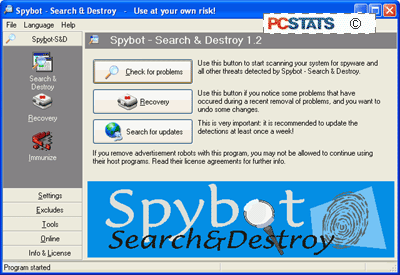
Ad-Aware and spybot S&D complement each other well, and it is recommended that you use them both for maximum peace of mind. Be sure to update them frequently through the built in update features. Either can be set to schedule updates and spyware checks for specific times, so you can schedule a daily sweeping of your system for unwanted spyware.
In addition to protecting yourself with spyware removal utilities, using a firewall that is capable of blocking information going out from your computer to the Internet is also a good idea.
For more detail on how firewall work see PCstats' Firewall technology article. Various freely available software firewalls such as Zone Lab's Zonealarm are capable of this.
Credit : http://www.pcstats.com/articleview.cfm?articleid=1458&page=7
Spyware removal utilities
For increased security, set all other Active-X referencing options on this page to 'prompt' or even 'disable.' I would recommend 'prompt' to give you the maximum choice as you are surfing, though you may find the constant Active-X prompts annoying. Disabling them is unlikely to significantly affect your web experience.
The most common vector for unwanted installation of spyware programs (besides clicking the 'ok' button without looking) is using low security or incorrect settings of these Active-X control buttons. If your internet security is set to the 'low' setting, or you have manually enabled 'download signed active-x controls,' spyware can be installed on your computer without any further prompt for permission.
By enabling signed active-x controls to run, you have given consent for any software using a valid security certificate purchased from Verisign or obtained from another location, to run on your system.
Always ensure that the signed active-x controls option is set to 'prompt'. Software like Gator is positively friendly next to some software that can end up installed due to this loophole. Another method of protecting your computer is to use the Windows update feature frequently, since Microsoft generally patches security holes quickly after they are exposed.
Spyware removal utilitiesIf you suspect that your computer has been infested with one or more varieties of spyware, the best thing to do first is to install and run one of the freely available spyware detection and removal tools. Since manual removal tends to be rather complicated and differs for each program, and there is no real centralized body of information for dealing with spyware as there is for Trojan horse and virus programs (www.sarc.com ), using the removal software is certainly the first option.
Lavasoft's Ad-Aware is the most well known of these spyware removal tools. Now up to version 6, it works essentially like a virus checker, scanning locations on your computer for the signature files, registry entries and cookies (tracking files) of well-known spyware programs and websites/vendors. It is available both in a free personal edition and as a commercial package for businesses.
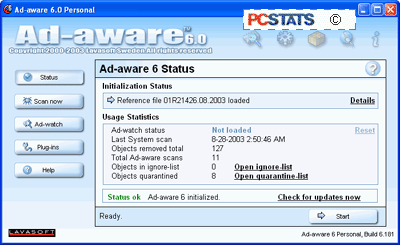
It is extremely easy to use, as it employs the familiar one-button scan, one button update mechanism seen in most popular anti-virus packages, and as such will feel familiar to most users. Ad-Aware will categorize files it finds during a scan, and recommend their removal. Ad-Aware is available here.
Credit : http://www.pcstats.com/articleview.cfm?articleid=1458&page=6
Setting Activex Controls
Assuming you are using windows XP and Internet Explorer, there are some browser settings that can be configured to ensure a safer surfing experience, primarily dealing with how activex controls are handled by your browser. Activex controls are essentially programs that can be run by Windows operating systems straight from a web page. These can include many things such as web forms, sound and graphics, but what we are primarily concerned about is installation programs.
Many vendors, such as Gator Corporation, use Activex controls to enable the installation of their software from participating websites. By default, all Windows operating systems will prompt users for permission to install such applications, but it is possible to set your browser to bypass user permission and automatically run Activex controls. To avoid this:
From Internet Explorer, click 'tools' then 'internet options' and select the 'security' tab.
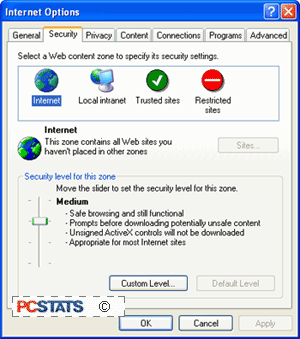
Select the 'custom level' button.
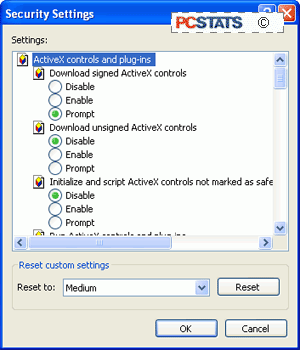
To begin with, ensure that 'download unsigned Active-X controls' and 'initialize and script Active-X controls not marked as safe' are disabled.
Credit : http://www.pcstats.com/articleview.cfm?articleid=1458&page=5
What can you do about spyware?
As you have probably realized by now, there are many different ways in which spyware can manifest itself on your computer. In many cases, it may not be at all obvious that your system and your privacy are being compromised. To safeguard yourself against unwanted software, first and foremost read the fine print. The majority of spyware applications attempt to install themselves either from security permission windows such as this one,
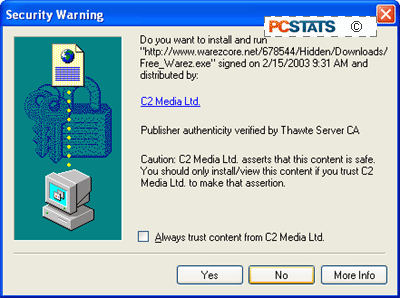
or as 'opt-out' components of the installation process of other software. 'Opt-out' meaning that the software will be installed by default, and you must specifically request during the install process that it not be added. Both can be easily avoided if you are diligent about reading screens and licenses before you click 'ok'.
Credit : http://www.pcstats.com/articleview.cfm?articleid=1458&page=4
Varieties of spyware
"Browser hijackers": A very noticeable and annoying type of program that changes your browser homepage setting to one of its choosing, and generally includes a small executable file that will run on start up, ensuring that it keeps coming back. Technically this is not spyware, since it does not generally send any information out, but can be included under the same umbrella term. Browser Hijackers are typically activex control triggered by visiting a specific URL. Some notable hijackers from recent history are xupiter.com and lop.com (and no, we don't recommend you try those links out).
"Scumware/thiefware": Another vague category, (named originally by affected webmasters, see www.scumware.com and www.thiefware.com ) containing the occasional forays made by adware providers into the more potentially lucrative territory of attempting to divert advertising revenue from other websites to themselves, using 'contextual advertising' among other methods.
It hit a peak in 2001-2002, with webmasters decrying the existence of spyware bundled with popular applications like Kazaa, Limewire and Morpheus that could alter the ID tags attached to advertising on a websites, redirecting and effectively stealing the commission. Widespread protest soon curbed this practice, as it did the Gator Corporation's attempt to redirect advertisting revenue by placing its own popup adds directly over the banner ads on websites.
Gator soon reverted to using non-strategically placed ads, and the major Peer to peer file-sharing companies removed or altered the offending software from their products. The current focus of webmasters' ire is companies who market client side 'contextual advertising' software. The idea of this is that the software, once installed, will superimpose its own hyperlinks on top of the text of any website you might be visiting, or place pop-up ad windows overlaying the site window, triggered by the content of the text or the URL you are visiting.
The targets of these links or pop-ups will be companies that advertise through the makers of the software, of course. Essentially, the software is parasitically attaching its own advertising to websites and diluting the advertising revenues they receive. Companies producing contextual advertising software include eZula Inc. (www.ezula.com), WhenU (www.whenu.com) and the Gator corporation (www.gator.com)
Varieties of spyware
Spyware is a blanket term that covers all kinds of generally unhelpful software, from tools that enable companies to deliver ads to you based on your surfing habits, to programs that attempt to hijack your browser settings, all the way to software designed to steal ad-revenue from legitimate online businesses by covering or replacing their adds. Here's a brief guide to some of the categories of nastiness that you may see.
Adware: The most common form of spyware, these are programs which will observe your surfing habits, then report them to one or more servers on the Internet who will then tailor advertising content to your preferences and deliver it to your computer through pop-ups or other methods. Adware is generally bundled in with various freeware applications to help the producers defray the costs, or in some cases, bundled with software produced by the same company, where the license to use the software hinges on the users' acceptance of the adware working in the background. Examples of adware applications include Gator and Doubleclick.
Almost all major peer-to-peer file-sharing programs, such as Kazaa Media Desktop, contain adware. There is a fine line between adware and ad-supported software, and it's generally at the point where you decide the loss of privacy is worth the value of the product you are being offered. In many cases, the products are being marketed towards novice computer users, under the obvious assumption that they will not realize the functionality of the software can be found in other products without unnecessary adware bundled in. This possible exploitation of the unwary, and the idea that some companies involved do not necessarily reveal the extent of the information they are harvesting or the uses to which they intend to put it, tilts the scales.
Be aware that using some of the methods detailed later on to block or remove adware can violate the license agreement of the programs it was included with. This is true in the case of the Gator Corporation's software such as Ewallet and Weatherscope, and also with Kazaa Media Desktop.
Credit : http://www.pcstats.com/articleview.cfm?articleid=1458&page=3
Spyware Vs. Ad-supported software
As a society, we expect advertising. We are used to the idea that advertising provides a source of revenue for businesses that would otherwise find it difficult to charge for their service or content, keeping television, radio and the Internet available and mostly affordable for the average citizen.
Ads have become an essential part of the Internet economy, and will likely stay that way for the foreseeable future. As such, it is important, at least for the health of some sections of the software industry, to make the distinction between spyware and ad-supported software.
Again, as stated in the section above, there are no official or legal definitions of these types of software, but as a generally accepted guideline, ad-supported software can be defined as a freely available product that is funded by advertising.
Of course, this means the entire Internet is essentially ad-supported software, but I digress… ad-supported software products will inform you prior to installation that advertising is part of the provided package, and that information may be transmitted from your computer to aid in targeting these adverts, allowing you to make an informed choice.
Ad-supported software is a major source of revenue for many smaller software companies, and can provide consumers with economical alternatives to costly software. A good example of ad-supported software is the 'sponsored mode' of the popular Eudora mail client. Note the presence of advertising is clearly stated.
Ad-supported software can be an excellent way for small companies to market their products provided they are upfront with their methods. The point at which spyware branches off from ad-supported software is when the software does not clearly state its intended purpose.
Credit : http://www.pcstats.com/articleview.cfm?articleid=1458&page=3
Thursday, February 15, 2007
Protect Yourself From Spyware
5 Easy Steps To Help You
If its not one thing, its another. That is one of those ridiculous phrases that pretty much goes without saying. Like "wherever you go, there you are." But, in this case it seems appropriate.
Allow me to elaborate. Computers on the Internet are almost constantly bombarded with viruses and other malware- so users employ antivirus software to protect themselves. Email inboxes are constantly flooded with pathetically useless spam- so users employ anti-spam programs and techniques to protect themselves. As soon as you think you have things under control you find out your system has a myriad of spyware and adware programs silently running in the background monitoring and reporting on your computer activity. Hence, "if its not one thing, its another."
The more benign spyware and adware simply monitors and tracks your the sites you visit on the web so that companies can determine the web-surfing habits of their users and try to pinpoint their marketing efforts. However, many forms of spyware go beyond simple tracking and actually monitor keystrokes and capture passwords and other functions which cross the line and pose a definite security risk.
How can you protect yourself from these insidious little programs? Ironically, many users unwittingly agree to install these programs. In fact, removing some spyware and adware might render some freeware or shareware programs useless. Below are 5 easy steps you can follow to try to avoid and, if not avoid, at least detect and remove these programs from your computer system:
If its not one thing, its another. That is one of those ridiculous phrases that pretty much goes without saying. Like "wherever you go, there you are." But, in this case it seems appropriate.
Allow me to elaborate. Computers on the Internet are almost constantly bombarded with viruses and other malware- so users employ antivirus software to protect themselves. Email inboxes are constantly flooded with pathetically useless spam- so users employ anti-spam programs and techniques to protect themselves. As soon as you think you have things under control you find out your system has a myriad of spyware and adware programs silently running in the background monitoring and reporting on your computer activity. Hence, "if its not one thing, its another."
The more benign spyware and adware simply monitors and tracks your the sites you visit on the web so that companies can determine the web-surfing habits of their users and try to pinpoint their marketing efforts. However, many forms of spyware go beyond simple tracking and actually monitor keystrokes and capture passwords and other functions which cross the line and pose a definite security risk.
How can you protect yourself from these insidious little programs? Ironically, many users unwittingly agree to install these programs. In fact, removing some spyware and adware might render some freeware or shareware programs useless. Below are 5 easy steps you can follow to try to avoid and, if not avoid, at least detect and remove these programs from your computer system:
- Be Careful Where You Download: Unscrupulous programs often come from unscrupulous sites. If you are looking for a freeware or shareware program for a specific purpose try searching reputable sites like tucows.com or download.com.
- Read the EULA: What is an EULA you ask? End User License Agreement. It's all of the technical and legal gibberish in that box above the radio buttons that say "No, I do not accept" or "Yes, I have read and accept these terms". Most people consider this a nuisance and click on "yes" without having read a word. The EULA is a legal agreement you are making with the software vendor. Without reading it you may be unwittingly agreeing to install spyware or a variety of other questionable actions that may not be worth it to you. Sometimes the better answer is "No, I do not accept."
- Read Before You Click: Sometimes when you visit a web site a text box might pop up. Like the EULA, many users simply consider these a nuisance and will just click away to make the box disappear. Users will click "yes" or "ok" without stopping to see that the box said "would you like to install our spyware program?" Ok, admittedly they don't generally come out and say it that directly, but that is all the more reason you should stop to read those messages before you click "ok".
- Protect Your System: Antivirus software is somewhat misnamed these days. Viruses are but a small part of the malicious code these programs protect you from. Antivirus has expanded to include worms, trojans, vulnerability exploits, jokes and hoaxes and even spyware and adware. If your antivirus product doesn't detect and block spyware you can try a product like AdAware Pro which will protect your system from spyware or adware in real time.
- Scan Your System: Even with antivirus software, firewalls and other protective measures some spyware or adware may eventually make it through to your system. While a product like AdAware Pro mentioned in step #4 will monitor your system in real time to protect it, AdAware Pro costs money. The makers of AdAware Pro, Lavasoft, also have a version available for free for personal use. AdAware will not monitor in real time, but you can manually scan your system periodically to detect and remove any spyware. Another excellent choice is Spybot Search & Destroy which is also available for free.
If you follow these five steps you can keep your system protected from spyware proactively and detect and remove any that does manage to get into your system. Good luck!
Credit : From Tony Bradley, CISSP-ISSAP,
What Types of Spyware are Out There
By Brian VanNess and Joanne C. Weaver
Spyware is any software that obtains information from a PC without the user’s knowledge. There are many different types of spyware operating on the Internet but you can generally group them into two categories:
Domestic Spyware and Commercial Spyware.Domestic Spyware is software that is usually purchased and installed by computer owners to monitor the Internet behavior on their computer networks. Employers use this software to monitor employee online activities; some family members use domestic spyware to monitor other family members (such as reviewing the content of children’s chat room sessions).A third party can also install domestic spyware without the knowledge of the computer owner. Law enforcement officials have used domestic spyware to monitor suspected criminal activity and criminals have used domestic spyware to siphon personal information from private computers in order to steal assets.
Commercial Spyware (also known as adware) is software that companies use to track your Internet browsing activities. Companies that track your online habits often sell this information to marketers who then hit you with targeted advertising—ads that match your browsing interests and would most likely appeal to you.
Advertisers are delighted when they acquire such valuable marketing information so easily; in the past marketers had to bribe you to learn your preferences through contests, registration surveys and the like. Those methods of gaining your personal information still exist, but in those cases you have the power to read the fine print to learn the fate of your data and so could choose to consent or refuse. Gaining your preferences by stealth using software spies is far easier and offers a much more complete picture for the marketing industry; as a result, spyware is everywhere. For more information on how and when spyware attaches itself to your computer, read How Did Spyware End Up on My Computer?
At the very least, spyware is a nuisance—slowing down your computer, filling your hard drive with useless gunk and marking you as a target for enterprising advertisers. Beyond intruding on your privacy, spyware can be used as a tool to perpetuate crimes, such as identify fraud. Below is a list detailing different types of spyware and the purposes for each.
Internet URL loggers & screen recordersURL loggers track websites and pages visited online; screen recorders can take a small grayscale snapshot image of your screen every time it changes and can store or transmit these without notifying you. These methods are common to Domestic spyware.
Chat loggers & email recordersEmail recorders and chat loggers are similar, making a text copy of all incoming and outgoing email and chat sessions. Domestic spyware frequently utilizes these methods.
Keyloggers & password recordersWhen
you bank online with this software on your hard drive someone is looking over your shoulder. Password recorders do just that—track typed passwords. Keylogger software records all of your keystrokes, not just passwords.
Web bugs
Web bugs are also known as advertiser spyware or adware. When you have adware on your computer you receive targeted, popup ads after you perform some action, such as typing something into a search engine. This advertising can even appear on your screen even when you are not online. If you are pummeled with new advertising screens constantly, you most likely have web bug spyware installed on your computer.
Browser hijacking
Browser hijackers place Internet shortcuts on your Favorites Folder without prompting you. This shortcut will lead many accidental viewers to their website so that they may artificially inflate their website's traffic stats; this enables them to receive higher advertising revenues at the expense of your time. You may be able to get rid of these false favorites by changing your Internet options, but occasionally the only way to get rid of these annoying shortcuts is to go into your registry and delete them. However, some spyware installs a safety net for itself that resets the spyware on your registry each time you reboot. Your only option to kill this aggressive type of spyware is to reformat your hard drive or to utilize an excellent anti-spyware program.
Modem hijacking
If you use a telephone modem for your Internet connection, an unscrupulous person may be able to install an online dialer on your computer to establish a new Internet connection that uses pricy 900-type long-distance phone numbers—quite a shock when you get your next telephone bill. These dialer spyware programs often piggy-back on spam and porn emails; simply opening the email can inadvertently initiate the dialer installation. The hard-to-track villain banks on the fact that you’ll pay your phone bill in full before you take time to figure out what happened.
PC hijacking
Some borrow your computer system for their own use—spyware users can hijack your connection to send their spam through your ISP. This means that a parasitical spammer can send thousands of spam emails through your computer connection and your ISP address. High-volume, high speed Internet access lines are targeted by users of this spyware. Often victims don’t realize that their good name has been muddied until their ISP cuts them off due to spam complaints.
Trojans & viruses
Like the wooden Trojan horse that the Greeks used to enter Troy, this spyware masquerades as a something harmless yet can compromise your computer—your data may be copied, distributed or destroyed. A virus is similar but has the additional power to replicate itself, causing damage to multiple computers. Both of these vicious pieces of software fall under the definition of spyware because the user is unaware of and would not condone their true purpose.
Spyware is any software that obtains information from a PC without the user’s knowledge. There are many different types of spyware operating on the Internet but you can generally group them into two categories:
Domestic Spyware and Commercial Spyware.Domestic Spyware is software that is usually purchased and installed by computer owners to monitor the Internet behavior on their computer networks. Employers use this software to monitor employee online activities; some family members use domestic spyware to monitor other family members (such as reviewing the content of children’s chat room sessions).A third party can also install domestic spyware without the knowledge of the computer owner. Law enforcement officials have used domestic spyware to monitor suspected criminal activity and criminals have used domestic spyware to siphon personal information from private computers in order to steal assets.
Commercial Spyware (also known as adware) is software that companies use to track your Internet browsing activities. Companies that track your online habits often sell this information to marketers who then hit you with targeted advertising—ads that match your browsing interests and would most likely appeal to you.
Advertisers are delighted when they acquire such valuable marketing information so easily; in the past marketers had to bribe you to learn your preferences through contests, registration surveys and the like. Those methods of gaining your personal information still exist, but in those cases you have the power to read the fine print to learn the fate of your data and so could choose to consent or refuse. Gaining your preferences by stealth using software spies is far easier and offers a much more complete picture for the marketing industry; as a result, spyware is everywhere. For more information on how and when spyware attaches itself to your computer, read How Did Spyware End Up on My Computer?
At the very least, spyware is a nuisance—slowing down your computer, filling your hard drive with useless gunk and marking you as a target for enterprising advertisers. Beyond intruding on your privacy, spyware can be used as a tool to perpetuate crimes, such as identify fraud. Below is a list detailing different types of spyware and the purposes for each.
Internet URL loggers & screen recordersURL loggers track websites and pages visited online; screen recorders can take a small grayscale snapshot image of your screen every time it changes and can store or transmit these without notifying you. These methods are common to Domestic spyware.
Chat loggers & email recordersEmail recorders and chat loggers are similar, making a text copy of all incoming and outgoing email and chat sessions. Domestic spyware frequently utilizes these methods.
Keyloggers & password recordersWhen
you bank online with this software on your hard drive someone is looking over your shoulder. Password recorders do just that—track typed passwords. Keylogger software records all of your keystrokes, not just passwords.
Web bugs
Web bugs are also known as advertiser spyware or adware. When you have adware on your computer you receive targeted, popup ads after you perform some action, such as typing something into a search engine. This advertising can even appear on your screen even when you are not online. If you are pummeled with new advertising screens constantly, you most likely have web bug spyware installed on your computer.
Browser hijacking
Browser hijackers place Internet shortcuts on your Favorites Folder without prompting you. This shortcut will lead many accidental viewers to their website so that they may artificially inflate their website's traffic stats; this enables them to receive higher advertising revenues at the expense of your time. You may be able to get rid of these false favorites by changing your Internet options, but occasionally the only way to get rid of these annoying shortcuts is to go into your registry and delete them. However, some spyware installs a safety net for itself that resets the spyware on your registry each time you reboot. Your only option to kill this aggressive type of spyware is to reformat your hard drive or to utilize an excellent anti-spyware program.
Modem hijacking
If you use a telephone modem for your Internet connection, an unscrupulous person may be able to install an online dialer on your computer to establish a new Internet connection that uses pricy 900-type long-distance phone numbers—quite a shock when you get your next telephone bill. These dialer spyware programs often piggy-back on spam and porn emails; simply opening the email can inadvertently initiate the dialer installation. The hard-to-track villain banks on the fact that you’ll pay your phone bill in full before you take time to figure out what happened.
PC hijacking
Some borrow your computer system for their own use—spyware users can hijack your connection to send their spam through your ISP. This means that a parasitical spammer can send thousands of spam emails through your computer connection and your ISP address. High-volume, high speed Internet access lines are targeted by users of this spyware. Often victims don’t realize that their good name has been muddied until their ISP cuts them off due to spam complaints.
Trojans & viruses
Like the wooden Trojan horse that the Greeks used to enter Troy, this spyware masquerades as a something harmless yet can compromise your computer—your data may be copied, distributed or destroyed. A virus is similar but has the additional power to replicate itself, causing damage to multiple computers. Both of these vicious pieces of software fall under the definition of spyware because the user is unaware of and would not condone their true purpose.
What makes a great Anti-Spyware solution?
Below we highlighted the attributes that we at Anti-Spyware Software Review consider to be the most important when purchasing spyware and adware detection and removal software.
- Feature Set – Does the anti-spyware include tools to enhance the ease of spyware detection and removal? Does the software offer descriptions of detected spyware so you can determine whether or not you want to keep each item? Are there auto-update and auto-scheduling capabilities available to save you time and keep you up-to-date and protected? Are there "undo" capabilities in case you accidentally delete something you actually need?
- Effectiveness– Does the product provide real-time protection from spyware—preventing its installation instead of just removing it afterward? Is the product effective at finding and removing the many different types of spyware and adware? Does the manufacturer keep their product up-to-date with new spyware definitions?
- Ease of Use – How easy is the product to use? Can you quickly find the features you are looking for? Are the descriptions easily understood or do they assume you know all the appropriate jargon? How quickly does the software perform the scan?
- Customization – Can you target select portions of your computer to save on scanning time? Are there other options available to accommodate different needs, such as opting out of removal of certain items, or scanning to remove spyware that alters your Internet settings?
- Ease of Setup / Installation – Is it easy to download and install the product? Can you get it up and running without consulting a book or a tech support person?
- Help / Support – Is there a Help section installed with the product? Is it easy to find answers to your questions? Is there someone you can call for support? How quickly does the support staff respond to your email questions?
With the right solution for removing and detecting spyware in place, you can keep your computer privacy protected and your PC ad-free.
Anti Spyware 2007 review click here : http://anti-spyware-review.toptenreviews.com/
Wednesday, February 14, 2007
SpyFalcon Removal Instructions
SpyFalcon General Description
SpyFalcon is a rogue anti-spyware application. SpyFalcon may appear as an icon in your Windows tray and show a message that says your PC is infected with malware. SpyFalcon may then suggest you download and install software to remove this malware. If you follow its directions, you will download SpyFalcon, and once downloaded SpyFalcon may redirect your Internet Explorer home page and search results to a malicious website. SpyFalcon may also download and install other software without your permission. SpyFalcon may be distributed through bundles of trojans and other malware.
Remove "SpyFalcon"
Automatically:Download SpyFalcon removal software.
How can I get rid of "SpyFalcon"?
Your best defense to remove SpyFalcon, or any other spyware, is to quickly detect and delete SpyFalcon processes, registry keys, DLL files, and other hazardous SpyFalcon files from your computer. Click here to manually uninstall SpyFalcon using "Add/Remove Programs" in your PC.
Remove SpyFalcon Manually
Note: This manual removal process is difficult and you run the risk of destroying your computer. We recommend that you use the automatic removal process.
Remove SpyFalcon processes:
dfrgsrv.exemscornet.exe mssearchnet.exenvctrl.exespyfalcon.exeuninst.exe
Remove SpyFalcon registry values:
HKEY_LOCAL_MACHINESOFTWAREMicrosoftWindowsCurrentVersionRunSpyFalconD1A2E7CD-F5C1-21A8-CA2C-13D0AC72D19D244B730E-D899-4E38-9428-03D1143242E0
HKEY_LOCAL_MACHINESOFTWAREMicrosoftWindowsCurrentVersionAppManagementARPCacheSpyFalcon
HKEY_LOCAL_MACHINESOFTWAREMicrosoftWindowsCurrentVersionUninstallSpyFalconcbb430e6-5b1b-474a-9d7e-160d4fe74bea
SOFTWARE\Microsoft\Windows\CurrentVersion\Explorer\SharedTaskScheduler\cbb430e6-5b1b-474a-9d7e-160d4fe74bea
SOFTWARE\Microsoft\Windows\CurrentVersion\Explorer\SharedTaskScheduler\6c69e319-0d03-47da-997a-36586cbc53b3
SOFTWARE\Microsoft\Windows\CurrentVersion\Explorer\SharedTaskScheduler\89aef01d-d237-49c7-84dc-4e1904c1fd31
SOFTWARE\Microsoft\Windows\CurrentVersion\Explorer\SharedTaskScheduler\24c60b9b-26b5-4201-9f7a-fb9219356ae9
SOFTWARE\Microsoft\Windows\CurrentVersion\Explorer\SharedTaskScheduler\336ec37f-54bf-4f13-8237-03f64fa591e7
SOFTWARE\Microsoft\Windows\CurrentVersion\Explorer\SharedTaskScheduler\0c7416f0-dd23-420f-97f5-aae352ea2bf1
SOFTWARE\Microsoft\Windows\CurrentVersion\Explorer\SharedTaskScheduler\35a88e51-b53d-43e9-b8a7-75d4c31b4676a0c51615-738a-4542-801a-5af61614e182f5947202-e9cb-4a72-88e7-22f2cbd2b1246c69e319-0d03-47da-997a-36586cbc53b389aef01d-d237-49c7-84dc-4e1904c1fd3124c60b9b-26b5-4201-9f7a-fb9219356ae9336ec37f-54bf-4f13-8237-03f64fa591e70c7416f0-dd23-420f-97f5-aae352ea2bf135a88e51-b53d-43e9-b8a7-75d4c31b4676
Unregister SpyFalcon DLL
files:dxmpp.dllginuerep.dlloqipt.dlliqzv.dllhtey.dllulztc.dlloerucu.dllsbnudh.dllfyhhxw.dllappmagr.dllreglogs.dlltwain32.dllhigjxe.dllbolnyz.dllwfkduei.dllwinrge32.dll
Detect and Delete these SpyFalcon files:
dfrgsrv.exe
mscornet.exe ms
searchnet.exe
nvctrl.exe
spyfalcon.exe
uninst.exe
dxmpp.dll
ginuerep.dll
oqipt.dll
iqzv.dll
htey.dll
ulztc.dll
oerucu.dll
sbnudh.dll
fyhhxw.dll
appmagr.dll
reglogs.dll
twain32.dll
ldX].tmp
syg.db
spyfalcon.url
blacklist.txt
english.ini
spyfalcon2.0.lnk
uninstallspyfalcon2.0.lnk
spyfalcon2.0website.lnk
spyfalcon.lnk
SpyFalconhigjxe.dll
bolnyz.dll
wfkduei.dll
winrge32.dll
Our Recommendation:
To avoid the unnecessary risk of damaging your computer, we highly recommend you use a good spyware cleaner/remover to track SpyFalcon and automatically find and remove other spyware, adware, trojans, and viruses in your PC.
SpyFalcon Automatic Remover:Download SpyFalcon remover software.
Adware Description:
Adware usually acts without your authorization or knowledge. Many free utilities may install hidden software, possibly to earn money for the author to recover development costs. While adware is not always malicious, it typically tracks your Internet activity and sends other information from your computer (which can include email addresses) to advertisers. With this information, you may now be a target for pop-up/pop-under advertisements, additional toolbars, and spam.
Is your PC infected with Adware?
Check for these Adware symptoms on your PC or click here for automatic check.
Is your PC infected with Adware?
Check for these Adware symptoms on your PC or click here for automatic check.
- Slow PC performance. Having even as few as one or two types of Adware can clog your bandwidth causing sluggish computer performance. Because types of Adware secretly operate in the background, you won't be able to easily detect them. Noticeable problems like computer taking long periods to turn on or a slow Internet connection - are signs that your computer may have Adware.
- New desktop shortcuts or homepage. Adware may add new desktop shortcuts or even change your settings to redirect your default homepage to point to another site. If you want your computer to be spyware-free, you must remove all traces of Adware.
- Bombarded with annoying popups. Adware may bombard your computer with popup ads. Adware may prevent regular Internet activity and even track your surfing habits as well as your personal information. Remove Adware immediately because the more traces of Adware you have the more popups you'll see on your computer.
Credit : http://www.spywareremove.com/remove-Adware/index.html
Friday, February 9, 2007
Spyware Ops - A Year in Review
Spyware, malware, and online threats are growing at threateningly rapid rates. But a look back at the legal action taken this past year shows that it is not all unchecked criminal progress, as scores of operations were brought down in million dollar settlements.
The beginning of December marked the conclusion of Washington, USA's first case prosecuted under the state's 2005 Computer Spyware Act. The $1 million settlement with rogue anti-spyware vendor Secure Computer LLC., prohibits the company from using deceptive marketing techniques to promote its software.
Secure Computer was accused of marketing its product with misleading spam and pop-up ads that offered free spyware scans that would falsely detect infections on user's computers.
After filing the Secure Computer case, the Washington attorney general's office has settled anti-spyware suits against three other spyware programs: Spyware Slayer, QuikShield Security and SoftwareOnline.com's InternetShield and Registry Cleaner software.
While Washington is only the third U.S. state to file a spyware suit, trailing suits by New York and Texas in 2005, fourteen other states have passed anti-spyware legislation.
The U.S. Federal Trade Commission (FTC) has been doing its part to protect consumers from spyware by continuing to challenge unfair and deceptive cyber operations.
The agency has pursued and shut down nine spyware distributors since 2004, according to Tara Flynn, assistant director of the FTC's bureau of consumer protection.
November 2006 proved to be an active month in stopping alleged spyware purveyors.
At the start of the month, the FTC released the news that Zango Inc. was slapped with a $3 million dollar judgment, and the condition that the company must have user consent before installing software onto computers.
Shortly after, in mid November, ERG Ventures, LLC, the alleged distributor of the Trojan Media Motor program, was shut down by a U.S. district court following charges by the FTC.
The end of the month brought an FTC announcement that two more alleged spyware operations had been axed.
One settlement was reached with Odysseus Marketing Inc., charged in October 2005 with illegally downloading spyware onto consumers' computers, and then allegedly selling the stolen data. The company agreed to surrender $1.75 million in ill-gotten gains, with all but $10,000 suspended due to inability to pay.
The second settlement involved John Robert Martinson, principal of Spy Deleter, who was charged with unfairly selling anti-spyware software, in cooperation with Sanford "Spam King" "Spamford" Wallace. Martinson has been banned from further spyware practices, and was ordered a fine of $1.86 million, with all but $40,000 suspended because he was unable to pay.
As for Wallace, whose nicknames were earned in the '90's after his company, Cyber Promotions, invaded millions of consumers' PC's with spam e-mails, the FTC ordered a default judgment against him in May, forcing him to give up $4.1 million.
This past September, the FTC announced a hefty $2 million settlement with two companies and three individuals (Enternet Media Inc., Conspy & Co. Inc., Lida Rohbani, Nima Hakimi, and Baback Hakimi) that had been distributing alleged spyware software under the names Search Miracle, Miracle Search, EM Toolbar, EliteBar, and Elite Toolbar.
Other major spyware settlements in 2006, requiring the defendants give up almost $2 million in ill-gotten gains, include Spyware Assassin and Trustsoft, both charged with deceiving users with rogue anti-spyware programs.
Credit : http://www.lavasoft.com/company/newsletter/2006/12_31/article5.html
Spyware Top 10 in 2006
PandaLabs has released its list of the spyware most frequently detected by Panda ActiveScan in 2006. The top ranking spyware is Gator. This adware offers free use of an program if users agree to view a series of pop-up messages downloaded by Gator. Some versions of this spyware replace banners on web pages visited with those created by the malicious code itself.
Second and third place in the Top Ten are occupied by Wupd and Ncase respectively. Both offer free use of an application in exchange for showing advertising messages. They also monitor users’ Internet actions and gather data about behavior and preferences. This information is then used to personalize the advertising displayed. Additionally, Ncase changes the Internet Explorer home page, as well as the default search options.
Second and third place in the Top Ten are occupied by Wupd and Ncase respectively. Both offer free use of an application in exchange for showing advertising messages. They also monitor users’ Internet actions and gather data about behavior and preferences. This information is then used to personalize the advertising displayed. Additionally, Ncase changes the Internet Explorer home page, as well as the default search options.
The adware CWS is in fourth place. This can be installed without users’ consent or without them being fully aware of the functionality of the tool. Emediacodec, in fifth place in the Top Ten, has similar characteristics. It uses a series of techniques in order to prevent it being detected by antivirus companies. It can even terminate its own execution if it detects that it is being executed in a virtual machine environment, such as VMWare. In sixth place in the table is Lop, a type of adware with many variants. In most cases, this malicious code installs a toolbar with search features in Internet Explorer. It also displays numerous advertising pop-ups. Winantivirus, in seventh place, is categorized as a PUP, (Potentially Unwanted Program). It is downloaded onto computers by other malicious code, such as, Downloader.LHW and exploits application vulnerabilities in order to spread. Winantivirus is also capable of damaging users’ systems. CWS.Searchpmeup is in eighth place in the list. This malicious program changes the Internet Explorer home page and the default search options. The web page that it sets as the home page uses several exploits to download malware onto computers. Next in the ranking is Winfixer2005, a PUP that searches the computer for supposed ‘errors’ and then demands that users buy the program in order to repair them. Finally, in tenth place comes New.net, a spy program that adds a toolbar to Internet Explorer and collects information about the user, including Internet pages visited, etc. The final top 10 looks like this : 1. Position Spyware 2. Adware/Gator 3. Adware/WUpd 4. Adware/nCase 5. Adware/CWS 6. adware/emediacodec 7. Adware/Lop 8. Application/Winantivirus2006 9. Adware/CWS.Searchmeup 10. Application/Winfixer2005 11. Spyware/New.net The information gathered by PandaLabs about spyware in 2006 highlights the prevalence -seven of the Top Ten- of adware. This type of malware has grown continuously throughout the year and is expected to continue doing so in 2007. Similarly, in 2006 there has been an increase in rootkits and other malware that use similar techniques. A rootkit is a tool used to hide the processes of malicious codes, making them harder to detect. Another significant aspect of the last year has been the appearance of a new category of malware. Rogue antispyware claims to detect spyware or to repair errors. This increasingly prevalent malware detects flaws or malicious code on computers but then demands that users pay for a registered version of the program if they want to delete these threats. WinAntivirus2006, in seventh place in the Top Ten, is a good example of this new category. Some of them, such as SpySheriff, 23rd in the ranking, not only detect real errors or attacks but also claim to have detected malware which actually does not exist. Winfixer2005, in ninth place, is another example of malicious code that promises to repair non-existent errors. False codecs are variants of this type of malware. EmediaCodec, in fifth place in the Top Ten, is a good example of this type of malicious code. The way this malware operates is quite simple. While the user is viewing the Internet, they are offered certain videos, normally pornographic. In order to see them, they have to install a false codec which downloads adware. Normally these are not real codecs, but passwords that register in the system and have to be installed in order to see the videos. Credit : http://www.bestsecuritytips.com/news+article.storyid+125.htm |
pyware, data privacy bills reappear in House
In October 2004, all but one member of the U.S. House of Representatives voted for a bill that was supposed to curtail the threat of malicious PC-disrupting spyware.
But the Senate ignored it. So the House once again approved spyware regulations in May 2005, which yielded precisely the same lack of a result.
Hoping that the third time proves the charm, House leaders on Thursday introduced a bill that would once again try to impose 31 pages of regulations on the software industry in an effort to define what types of activities are permissible and which ones aren't.
Rep. John Dingell, a Michigan Democrat and the chairman of the House Energy and Commerce Committee, called the announcement "a serious down payment on resolving the scourge of identity theft and related abuse." He promised that legislation would be sent to the House floor "expeditiously.
Dingell was referring not only to the spyware measure but also to three other proposals announced at the same time: a bill to regulate telephone pretexting, one to curb the sale of Social Security numbers, and one to impose many additional security requirements including data breach notifications on private companies (though not federal agencies).Taken together, the measures represent a broad and surprisingly bipartisan attempt by House leaders to rewrite many electronic privacy laws. But they still face substantial obstacles in the form of senators who proposed an alternative security breach approach two days earlier, opposition from telephone companies, and fatigue from politicians who recently approved another anti-pretexting bill that President Bush signed into law just last month.
Another political obstacle could be large data brokers that buy and sell personal information on Americans including Social Security numbers, and the police agencies that are their customers and might find some of their data flow drying up. As far back as July 2000, Congress held a hearing on a bill to restrict the sale of Social Security numbers--an idea that died quietly in a Senate committee.
Here's a summary of the four bills introduced on Thursday:
• Reps. Edolphus Towns (D-N.Y.) and Mary Bono (R-Calif.) announced the so-called Spy Act, which contains extensive regulations on what types of actions software may perform. Resetting the browser's home page is not allowed, for instance, but "good faith" efforts to remove malicious software are permitted.
• The Data Accountability and Trust Act, sponsored by Reps. Bobby Rush (D-Ill.) and Cliff Stearns (R-Fla.), says that any business that houses personal information must implement specific security practices, including methods for dealing with disposal of "obsolete" information. Like many of the data security proposals that have been circulating in Congress during the past few years, it would also mandate notification requirements in the event of a breach of personal data.
In a letter to Congress on Thursday, representatives from the liberal advocacy groups Consumers Union and Consumer Federation of America endorsed the effort, calling it "a reasonable approach to this alarming problem that will provide consumers with significant protections from the harms that can arise from preventable data breaches." A Washington representative of RSA, part of EMC Corp., also expressed support for the bill, saying it would be better to have one national standard for breach notification rather than a patchwork of state rules.
• Reps. Edward Markey (D-Mass.) and Joe Barton (R-Texas) want to make it unlawful to sell or purchase Social Security numbers, an approach also proposed by Sen. Dianne Feinstein (D-Calif.). Exceptions include law enforcement and national security purposes, public health reasons, research for the "purpose of advancing public knowledge," "legitimate" consumer credit verification and emergency situations.
• Dingell and Barton also are behind the Prevention of Fraudulent Access to Phone Records Act, which targets pretexting of phone records--that is, fraudulent access to them--and would impose sweeping and expensive regulations on telephone companies. They could, for instance, share customer information with third parties, including business partners, only if a customer gave "express prior authorization."
CTIA-The Wireless Association representative Joseph Farren said a law that criminalizes pretexting and received President Bush's signature last month goes far enough.
"The new law will serve as a significant and meaningful deterrent to individuals who would contemplate this criminal trade and feel additional legislation is unnecessary at this time," he said in an e-mail interview Thursday. An AT&T spokesman also expressed skepticism.
Thursday, February 8, 2007
Anti Spyware download : WinTasks 4 Professional

http://www.liutilities.com/products/wintaskspro/whitepapers/paper2/WinTasks 4 lists all processes running on your computer, including invisible background processes like spywares. Since WinTasks also assigns more user-friendly names to each process (e.g. Internet Explorer instead of iexplore.exe) as well as the full executable path, finding and terminating spyware processes is relatively easy.
Anti Spyware download : Xcleaner

http://www.xblock.com/Xcleaner is a multi-purpose privacy tool that scans for adware and invasive spyware like trojans, keyloggers, etc. In many cases it is able to strip and reveal the password of the spyware so you can find out who installed it. Includes cleaning and wiping functions for files and advanced password generation
Anti Spyware download : SpyCop

http://www.regnow.com/softsell/visitor.cgi?affiliate=11859&action=site&vendor=4593%20 Our SpyCop software will search your Windows 95/98/ME/2000/XP computer and alert you instantly if your system has any of the covert surveillance spy programs installed !
Anti Spyware download : Spytech NetArmor

http://www.regnow.com/softsell/visitor.cgi?affiliate=11859&action=site&vendor=2658%20NetArmor is your solution to preventing and detecting net-borne attacks from malicious hackers and backdoor trojan users. It accurately tracks all connections on your PC - and can alert you on possible malicious attacks madeNetArmor eliminates worries about being attacked by hackers ever again.
The also have a whole suite of products available here
Anti Spyware download : NeoWatch 2.0

http://www.neoworx.com/ Info Publisher: NeoWorx System: Win95/98/ME/NT 4.0/2 Version: 2.0 English NeoWatch is a personal firewall with intrusion detection designed for small businesses and home users. It is intended to offer the greatest protection possible for users having dial-up Internet service and/or high speed Internet connections like DSL and Cable modems. NeoWatch integrates with NeoTrace technology to allow for the location identification of the intrusion with extreme accuracy. Handy for again tracing and tracking the source of a Spyware intrusion.
Anti Spyware download : No-Aura

Download No-Aura allows you to disable communication between Aureate/Radiate advertising enabled software and the statistical server. It does this by adding the Aureate/Radiate server IPs to the Windows HOST file with the IP of 127.0.0.1, which will resolve them to your localhost. So instead of contacting the remote server, it will simply contact your own system. Intended for temporary use in network troubleshooting, other use may violate the license agreement of your advertising supported software.
Anti Spyware download : SpyChecker

http://www.spychecker.com/Detect "Spyware" before you download! Spychecker can detect almost one thousand so called "Spyware" products by name. If you are not sure if the freeware program you are interested in is in fact advertising supported Spyware, simply enter the name in the Spychecker box and hit "Check" Spychecker will query the constantly updated Spychecker.com database and display the results in your browser, complete with a link to the privacy policy of the ad-company and more. Works with: Aureate/Radiate,Web3000,Conducent/TimeSink,Cydoor and several others
Anti Spyware download : Gibson Research OptOut

info download pre-release version (31k) Fast download, great producer, limited list of products it will remove but worth a try. The full commercial version should remove alot more. And certainly spend a few days going through the wealth of info on his site.(Note: Until the commercial version is released, the earlier freeware edition is the only one available for download. This version only detects Aureate spyware.)
Anti Spyware download : LavaSoft Ad-aware

Download now AD-aware now includes the detection and removal of Web3000, Gator, Cydoor, Radiate\Aureate, Flyswat, Conducent\TimeSink and CometCursor (1.0 and 2.0)Ad-aware v5 now available.
SPYWARE EXAMPLES
There are thousands of different spyware parasites. The following examples illustrate how treacherous and harmful spyware can be.
CoolWebSearch is the entire family of browser hijackers that all attempt to redirect a web browser to the coolwebsearch.com domain. Most of these threats display advertisements, change web browser's default start and search pages and modify security settings. From the first sight, CoolWebSearch parasites are relatively harmless. However, some variants are able to steal user passwords, bank account details and other identity data. These pests are virtually impossible to remove.
Infamous Gator spyware made the headlines because of its enormous prevalence. Various Gator variants are still bundled with ad-supported software and can get into the system from insecure web sites. Parasites display numerous advertisements and install additional spyware components without user consent. Most of their victims noticed increased frequency of web browser crashes and overall system instability. Practically all Gator variants include parts that stay active even after a user uninstalls the pest.
BonziBuddy spyware is targeted at children. Its description says that the program displays an animated on-screen ape that helps kids to surf the web and use e-mail. However, BonziBuddy also silently installs several additional spyware parasites that not only violate user privacy, but also affect computer’s performance and security.
Credit : http://www.2-spyware.com/spyware-removal
CoolWebSearch is the entire family of browser hijackers that all attempt to redirect a web browser to the coolwebsearch.com domain. Most of these threats display advertisements, change web browser's default start and search pages and modify security settings. From the first sight, CoolWebSearch parasites are relatively harmless. However, some variants are able to steal user passwords, bank account details and other identity data. These pests are virtually impossible to remove.
Infamous Gator spyware made the headlines because of its enormous prevalence. Various Gator variants are still bundled with ad-supported software and can get into the system from insecure web sites. Parasites display numerous advertisements and install additional spyware components without user consent. Most of their victims noticed increased frequency of web browser crashes and overall system instability. Practically all Gator variants include parts that stay active even after a user uninstalls the pest.
BonziBuddy spyware is targeted at children. Its description says that the program displays an animated on-screen ape that helps kids to surf the web and use e-mail. However, BonziBuddy also silently installs several additional spyware parasites that not only violate user privacy, but also affect computer’s performance and security.
Credit : http://www.2-spyware.com/spyware-removal
WHAT SPYWARE DOES?
- Steals sensitive personal information, identity details, monitors everything the user does online, tracks web browsing habits and sends all collected data to a remote server.
- Serves undesirable advertisements, displays large amount of annoying pop-ups. Such activity is specific to most illegal adware parasites.
- Redirects a web browser to advertising sites or commercial Internet search services whenever the user enters an incorrect site address or even without any obvious reasons.
- Changes web browser's default start and search pages to advertising sites and prevents the user from restoring initial settings. Such activity is common for all browser hijackers.
- Creates numerous links to advertising resources, places desktop shortcuts to third-party spyware sites, adds multiple bookmarks to the web browser's Favorites list.
- Modifies essential settings of a web browser, decreases overall system security level by enabling certain web browser's features that allow to quietly run any web scripts or install any software from the Internet.- Connects a compromised computer to the Internet through high
-cost phone number without user knowledge. This activity is specific to so called dialers. The system can be affected only if a modem is installed.
- Degrades overall system performance and causes software instability. Some parasites are badly programmed, they waste too much computer resources and conflict with installed applications.
- Provides no uninstall feature, hides processes, files and other objects in order to obstruct its removal as much as possible.
Credit : http://www.2-spyware.com/spyware-removal
- Serves undesirable advertisements, displays large amount of annoying pop-ups. Such activity is specific to most illegal adware parasites.
- Redirects a web browser to advertising sites or commercial Internet search services whenever the user enters an incorrect site address or even without any obvious reasons.
- Changes web browser's default start and search pages to advertising sites and prevents the user from restoring initial settings. Such activity is common for all browser hijackers.
- Creates numerous links to advertising resources, places desktop shortcuts to third-party spyware sites, adds multiple bookmarks to the web browser's Favorites list.
- Modifies essential settings of a web browser, decreases overall system security level by enabling certain web browser's features that allow to quietly run any web scripts or install any software from the Internet.- Connects a compromised computer to the Internet through high
-cost phone number without user knowledge. This activity is specific to so called dialers. The system can be affected only if a modem is installed.
- Degrades overall system performance and causes software instability. Some parasites are badly programmed, they waste too much computer resources and conflict with installed applications.
- Provides no uninstall feature, hides processes, files and other objects in order to obstruct its removal as much as possible.
Credit : http://www.2-spyware.com/spyware-removal
Ways of Infection
Ways of Infection
Spyware parasites differ from regular viruses. They do not spread by themselves and usually must be installed as any other software with or without the user’s consent. Some rare pests are able to exploit system security vulnerabilities and act similarly to worms. There are three major ways undesirable spyware program can get into the system.
1. Many spyware vendors deceive the user by presenting a particular spyware program as a useful tool, for example, a powerful web search service, fast download manager or reliable Internet accelerator. Users download and install such programs. However, practically all of them appear to be either completely useless or ineffective. Although in most cases users can uninstall such programs, spyware components stay in the system and remain fully functional.
2. Lots of free, ad-supported or shareware products are bundled with small add-ons needed by the host program to work properly. These add-ons actually are third-party spyware parasites. Uninstalling the host application not always removes bundled spyware.
3. Most widely spread spyware programs get into the system using Internet Explorer ActiveX controls or exploiting certain web browser vulnerabilities. Their vendors run insecure web sites filled with malicious code or distribute unsafe advertising pop-ups. Whenever the user visits such a site or clicks on such a pop-up, harmful scripts instantly install spyware. The user cannot notice anything suspicious, as parasites do not display any setup wizards, dialogs or warnings.
It is known that some spyware can also be dropped by specific viruses, trojans or worms.
Spyware affects mostly computers running Microsoft Windows operating system.
Credit : http://www.2-spyware.com/spyware-removal
Spyware parasites differ from regular viruses. They do not spread by themselves and usually must be installed as any other software with or without the user’s consent. Some rare pests are able to exploit system security vulnerabilities and act similarly to worms. There are three major ways undesirable spyware program can get into the system.
1. Many spyware vendors deceive the user by presenting a particular spyware program as a useful tool, for example, a powerful web search service, fast download manager or reliable Internet accelerator. Users download and install such programs. However, practically all of them appear to be either completely useless or ineffective. Although in most cases users can uninstall such programs, spyware components stay in the system and remain fully functional.
2. Lots of free, ad-supported or shareware products are bundled with small add-ons needed by the host program to work properly. These add-ons actually are third-party spyware parasites. Uninstalling the host application not always removes bundled spyware.
3. Most widely spread spyware programs get into the system using Internet Explorer ActiveX controls or exploiting certain web browser vulnerabilities. Their vendors run insecure web sites filled with malicious code or distribute unsafe advertising pop-ups. Whenever the user visits such a site or clicks on such a pop-up, harmful scripts instantly install spyware. The user cannot notice anything suspicious, as parasites do not display any setup wizards, dialogs or warnings.
It is known that some spyware can also be dropped by specific viruses, trojans or worms.
Spyware affects mostly computers running Microsoft Windows operating system.
Credit : http://www.2-spyware.com/spyware-removal
Removing Spyware : Finally
Unbeknownst to me, the US Government put out a document on this same subject just days before I put up this page (Recovering from a Trojan Horse or Virus). These instructions are better.
If you need to run a web browser from removable media (that is, a program that does not need to be installed on the hard disk) I know of two:
On the low end, there is Off By One, a single, standalone EXE that supports all versions of Windows
On the high end, John Haller has created a Portable Firefox. As of September 2005, the latest version was 1.0.6. Alternate link
A reader of this page suggested Bart's Preinstalled Environment (BartPE). It lets you boot from a CD into Windows, totally bypassing the corrupted copy of Windows. This lets you run your favorite malware removal software unmolested. I'll have to look into this. For more on Bart PE see: A Must-Have Repair And Recovery Tool by Fred Langa August 8, 2005.
Another reader of this page suggested the Ultimate Boot CD for Windows which is a bootable CD with software to repair, restore and diagnose computer problems. All the software is freeware and it uses Bart's PE (above). It does, however, require a Windows license. Then too, there is the Ultimate Boot CD.
Spybot v1.4 can run from a Windows Pre-installation Environment off a boot CD. I have not tried this.
Credit : Michael Horoz :http://www.michaelhorowitz.com/removespyware.html#stop
Removing Spyware : Prevention and Cleanup
This is a good time to round up the usual suspects: run Windows Update manually, adjust IE settings for high security, lower the size of the IE cache and the System Restore cache (XP and Me only), defrag, delete TEMP files and (for XP,2000) disable the Messenger service. Install an anti-virus product and get it up to date (bug fixes and virus definitions). Set both the anti-virus software and Windows Update for automatic updates. Needless to say, set up an anti-Spyware program to run in auto-protect mode.
For Windows XP and 2000, let me suggest setting task manager to run automatically in the system tray at boot time and train the user to watch for cpu spikes, a good first indicator of Spyware running in the background.
If ZoneAlarm is installed, set it to protect the Hosts file. If Norton AntiVirus is installed set a password for its configuration options. If your firewall allows, set a password on it to protect configuration changes. Likewise, the anti-Spyware software may also offer this feature.
Install the free SpywareBlaster program to update the kill bits in the registry and the IE Restricted Zone. This protection is partial, but better to have than not. Use it to make an IE settings snapshot backup.
Use my Java Tester web site to see which JVM, if any, is installed. If none, fine. If there is a Microsoft JVM, maybe upgrade to the current Sun JVM. This Macromedia page tells you the version of Flash that is installed and this page tells you what the latest Flash version is.
Install Firefox and a non-Microsoft email program (such as Thunderbird) and show the computer owner how to use them. Install the Flash plug-in for Firefox and possibly also Shockwave, Java and QuickTime. If the computer user is a beginner and unable or unwilling to deal with Firefox extensions, turn off the Firefox option that allows new extensions to be installed (Tools -> Options -> Web Features -> Allow web sites to install software). This should prevent future accidental software installs.
Show the user(s) how to back up their most important files (I teach a short class on backups, but only in New York City).
To prevent malware infections in the future, teach the user safe Internet techniques. The time spent here is probably well spent when compared to using software that automatically watches for new installs of malicious software (Spybot, BHODemon and the paid versions of Ad-aware can do this, among others). Any such software would need to be maintained and, when it finds something, the user may not fully understand the situation. Also, the software applies to a single computer, whereas safe computing habits apply everywhere. Along this line, I have a web page about recognizing and dealing with bad emails and maintain a page with malware links.
Credit : Michael Horoz :
http://www.michaelhorowitz.com/removespyware.html#stop
For Windows XP and 2000, let me suggest setting task manager to run automatically in the system tray at boot time and train the user to watch for cpu spikes, a good first indicator of Spyware running in the background.
If ZoneAlarm is installed, set it to protect the Hosts file. If Norton AntiVirus is installed set a password for its configuration options. If your firewall allows, set a password on it to protect configuration changes. Likewise, the anti-Spyware software may also offer this feature.
Install the free SpywareBlaster program to update the kill bits in the registry and the IE Restricted Zone. This protection is partial, but better to have than not. Use it to make an IE settings snapshot backup.
Use my Java Tester web site to see which JVM, if any, is installed. If none, fine. If there is a Microsoft JVM, maybe upgrade to the current Sun JVM. This Macromedia page tells you the version of Flash that is installed and this page tells you what the latest Flash version is.
Install Firefox and a non-Microsoft email program (such as Thunderbird) and show the computer owner how to use them. Install the Flash plug-in for Firefox and possibly also Shockwave, Java and QuickTime. If the computer user is a beginner and unable or unwilling to deal with Firefox extensions, turn off the Firefox option that allows new extensions to be installed (Tools -> Options -> Web Features -> Allow web sites to install software). This should prevent future accidental software installs.
Show the user(s) how to back up their most important files (I teach a short class on backups, but only in New York City).
To prevent malware infections in the future, teach the user safe Internet techniques. The time spent here is probably well spent when compared to using software that automatically watches for new installs of malicious software (Spybot, BHODemon and the paid versions of Ad-aware can do this, among others). Any such software would need to be maintained and, when it finds something, the user may not fully understand the situation. Also, the software applies to a single computer, whereas safe computing habits apply everywhere. Along this line, I have a web page about recognizing and dealing with bad emails and maintain a page with malware links.
Credit : Michael Horoz :
http://www.michaelhorowitz.com/removespyware.html#stop
Monday, February 5, 2007
Removing Spyware : Delete Away
This would be a good time to re-boot and run an anti-virus program.
- Portable ClamWin is just that, a portable version of ClamWin, a free antivirus program for Windows 98/Me/2000/XP/2003. Alternate Link
- F-Secure Anti-Virus for DOS is free for home use.
In October 2005 (more or less) McAfee released a version of their anti-virus software that runs completely off a U3 based thumb drive. - F-Prot is a free virus scanner that you can run under a bootable Linux CD such as Knoppix. I haven't tried this. From Knoppix Hacks by O'Reilly.
Remove the relatively honest Adware using Add/Remove Programs in the Control Panel.
Boot normally.
Use a process monitor to check for any malware that might have been auto-started. Anything that shows up here is pretty darn resistant. It may have detected that its process was being terminated and created a new instance of itself. Or, it may use different names and run from different locations at each startup. Or it may be auto-started from an obscure part of the registry that the software you used to control automatically run programs does not handle (AutoRuns seem pretty complete to me). Note the underlying EXE, reboot to DOS or the Recovery Console and rename this file. Trying to kill the process may only tell it that we are on its existence and trigger a defense mechanism.
In Windows XP and Me make a Restore Point.
Delete:
- All ActiveX controls (see below)
- The web browser cache (Temporary Internet Files) for each user for each browser.
- Temporary files
- Cookies (perhaps overkill, I admit)
- The web browser history
- Empty the recycle bin for each Windows user
- Clean out the Java cache folder for each Windows user. The current version of Java (1.5) stores the cache in: C:\Documents and Settings\userid\Application Data\Sun\Java\Deployment\cache\ You can also delete the cache using Control Panel - > Java -> General Tab -> Delete Files button How to Clean a Java Cache Folder from F-Secure
- Disable System Restore to delete the old Restore points, then re-enable it and take a new Restore point
Active X programs/controls reside in C:\WINDOWS\Downloaded Program Files on Windows XP/ME/98 and in C:\WINNT\Downloaded Program Files in Windows 2000. With IE6 and Windows 2000 and XP, the cache and cookiesreside in C:\Documents and Settings\userid\Local Settings\Temporary Internet FilesWindows XP SP2 displays the installed ActiveX controls and offers to disabled them, but I would rather delete them.
I have read that Ad-aware can run from a USB thumb drive, but haven't verified this myself. If it can, this would be a good time to run it.
Reboot normally. Hopefully, no malware is auto-started at this point.
In Windows XP and Me make a Restore Point.
Review the IE Trusted Zone (Tools -> Internet Options -> Security Tab -> Trusted Zones -> Sites button) and delete any web sites there. Review the IE Favorites and delete anything that looks suspicious. If there are too many malicious Favorites, then just rename the directory where they live (see below). Change the IE home page to a blank page (if you can). On the Content tab, click the Publishers button and remove any trusted publishers.
Internet Explorer Favorites live in C:\Documents and Settings\ userid\Favorites
Get a firewall program up and running.
If the machine already had a firewall installed, review the rules, it only takes a single exception to punch a big hole in the protection. Better yet, uninstall the current firewall and do a clean install of the latest version of the free edition of ZoneAlarm. ZoneAlarm is better than the firewall in Windows XP SP2 because it starts out with no exception rules and because it is more resistant to being shut down or disabled by malware.
Log on to the Internet.
Scan the entire hard disk for viruses. I used to like Housecall from Trend Micro but as of March 2006 it hasn't worked for me in months and I've tried it on many machines. Security Check from Symantec only finds bad stuff, it does not delete it. My virus links page has links to other online virus scanners.
Any computer infected with malware, is also likely to be infected with viruses. Better to get rid of the viruses first. Online virus scans should be used because client side anti-virus software may have been crippled.
In Windows XP and Me make a Restore Point.
At this point, none of the installed malicious software should be running automatically at system start-up and the machine should be virus free. This is the time to run a barrage of anti-Spyware programs. Sometimes, however, removing Spyware breaks TCP/IP. If the computer is running Windows XP SP2, then now is the time to display a list of all the software using Layered Service Provider. Run this command and save the output:
netsh winsock show catalog
Finally, it's time for anti-Spyware software. It's a shame that you need to run more than one, but you do. Opinions vary as to the "best" anti-Spyware programs, however, the following are generally respected and free.
- The classic programs are Ad-aware and Spybot.
- Trend Micro Anti-Spyware for the Web is free online Spyware removal
- Microsoft has an Anti-Spyware program that, as of this writing, is still in beta.
- SpyCatcher 2006 from Tenebril has a free Express edition
- Run the ActiveX based online CounterSpy scan from Sunbelt software (I've experienced some false positives with it). This is only a scan, if it finds something you want to remove, there is an installable free trial version.
- The Yahoo IE Toolbar uses the Pest Patrol engine and both detects and removes Spyware
- Can't hurt to run the ActiveX version of Microsoft's Malicious Software Removal Tool
CA offers a free ActiveX scan with Pest Patrol. However, if it finds anything there is no free trial. There used to be manual removal instructions, but that was before the product was purchased by Computer Associates. The downloadable 30 day free trial version of Spy Sweeper from Webroot used to remove Spyware, but no more. Now it only detects.
If Spyware was detected and removed by the above programs, then you should also remove any Restore Points (Windows XP and Me only) that may include the malicious software. You do this by turning off System Restore. Then turn it back on and make a new Restore Point.
Make sure that you can change the IE home page and security settings and that Internet Options appears in the Control Panel. If not, try HijackThis and/or read this article by Mike Healan.
In a Baltimore Sun article, (Patience, basic toolkit, updates to security can block Spyware July 29, 2004) Mike Himowitz suggested that the cleanup is not done at this point. On NT class machines with multiple users he warns that "Spyware programs embed themselves in each user's personal settings" which requires you to log off the current userid, logon as each of the other users and run the Spyware removal software again. He says "If you don't do this, your Spyware may come back." :-( Makes a clean install look better and better.
Did you create a new problem?
Running the usual anti-malware software can create problems. In the September 21, 2004 issue of PC Magazine, Bill Machrone wrote about malware that infests the TCP/IP stack. The usual anti-malware products removed only half the infection resulting in corrupted TCP/IP software. He found software to fix the problem under Windows XP avoiding the need to un-install and re-install TCP/IP itself. The article: Corruption at the Jersey Shore. The software: WinSock XP Fix 1.2
The problem has to do with the LSP feature of TCP/IP. The fixes described here reset the TCP/IP stack which will effect software that was using LSP (the software may need to be un-installed and re-installed). But which, if any, software depends on LSP? The output of the netsh command suggested earlier is that list. It may include anti-virus and firewall programs.
In Windows XP SP2 you can reset the LSP feature of TCP/IP with this command:
netsh winsock reset catalog
Then reboot.
Another free program along the same lines is LSP-Fix from Counterexploitation (cexx.org). It too, may help when the removal of Spyware programs disables Internet access. It fixes problems with Layered Service Provider (LSP) software that can be inserted into TCP/IP software.
And another problem can be created by removing Spyware:
You cannot log on to Windows XP after you remove Wsaupdater.exe MS KB Article : 892893 Last Review : October 17, 2006.
Subscribe to:
Posts (Atom)