For increased security, set all other Active-X referencing options on this page to 'prompt' or even 'disable.' I would recommend 'prompt' to give you the maximum choice as you are surfing, though you may find the constant Active-X prompts annoying. Disabling them is unlikely to significantly affect your web experience.
The most common vector for unwanted installation of spyware programs (besides clicking the 'ok' button without looking) is using low security or incorrect settings of these Active-X control buttons. If your internet security is set to the 'low' setting, or you have manually enabled 'download signed active-x controls,' spyware can be installed on your computer without any further prompt for permission.
By enabling signed active-x controls to run, you have given consent for any software using a valid security certificate purchased from Verisign or obtained from another location, to run on your system.
Always ensure that the signed active-x controls option is set to 'prompt'. Software like Gator is positively friendly next to some software that can end up installed due to this loophole. Another method of protecting your computer is to use the Windows update feature frequently, since Microsoft generally patches security holes quickly after they are exposed.
Spyware removal utilitiesIf you suspect that your computer has been infested with one or more varieties of spyware, the best thing to do first is to install and run one of the freely available spyware detection and removal tools. Since manual removal tends to be rather complicated and differs for each program, and there is no real centralized body of information for dealing with spyware as there is for Trojan horse and virus programs (www.sarc.com ), using the removal software is certainly the first option.
Lavasoft's Ad-Aware is the most well known of these spyware removal tools. Now up to version 6, it works essentially like a virus checker, scanning locations on your computer for the signature files, registry entries and cookies (tracking files) of well-known spyware programs and websites/vendors. It is available both in a free personal edition and as a commercial package for businesses.
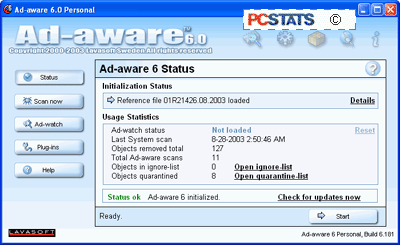
It is extremely easy to use, as it employs the familiar one-button scan, one button update mechanism seen in most popular anti-virus packages, and as such will feel familiar to most users. Ad-Aware will categorize files it finds during a scan, and recommend their removal. Ad-Aware is available here.
Credit : http://www.pcstats.com/articleview.cfm?articleid=1458&page=6
