Saturday, February 17, 2007

More removal utilities

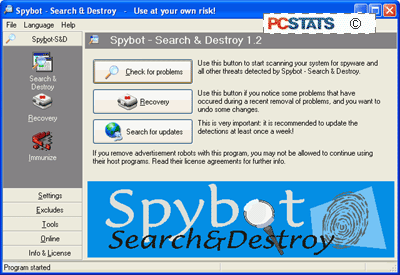
Another excellent free tool for finding and removing spyware programs is "Spybot Search and Destroy" by PepiMK Software. Though slightly less user friendly than Ad-Aware, it scans for a greater range of possible threats by default (including some windows security exploits) and also contains an 'immunization' feature.

The immunization feature attempts to pre-block certain known spyware activex installation routines from running in IE, and locks the HOSTS file and Internet Explorer settings to prevent them from being changed.

Spybot S&D also provides a greater body of information about the threats that it locates on your computer than Ad-Aware, helping you make the decision to remove them or not. It uses an online signature update model similar to Ad-Aware, and is available here.

Ad-Aware and spybot S&D complement each other well, and it is recommended that you use them both for maximum peace of mind. Be sure to update them frequently through the built in update features. Either can be set to schedule updates and spyware checks for specific times, so you can schedule a daily sweeping of your system for unwanted spyware.

In addition to protecting yourself with spyware removal utilities, using a firewall that is capable of blocking information going out from your computer to the Internet is also a good idea.

For more detail on how firewall work see PCstats' Firewall technology article. Various freely available software firewalls such as Zone Lab's Zonealarm are capable of this.


Credit : http://www.pcstats.com/articleview.cfm?articleid=1458&page=7

Spyware removal utilities

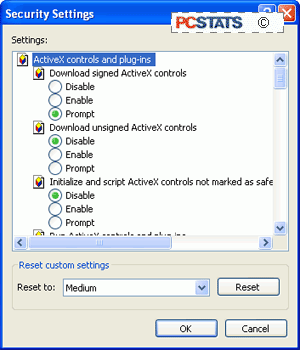
For increased security, set all other Active-X referencing options on this page to 'prompt' or even 'disable.' I would recommend 'prompt' to give you the maximum choice as you are surfing, though you may find the constant Active-X prompts annoying. Disabling them is unlikely to significantly affect your web experience.

The most common vector for unwanted installation of spyware programs (besides clicking the 'ok' button without looking) is using low security or incorrect settings of these Active-X control buttons. If your internet security is set to the 'low' setting, or you have manually enabled 'download signed active-x controls,' spyware can be installed on your computer without any further prompt for permission.

By enabling signed active-x controls to run, you have given consent for any software using a valid security certificate purchased from Verisign or obtained from another location, to run on your system.

Always ensure that the signed active-x controls option is set to 'prompt'. Software like Gator is positively friendly next to some software that can end up installed due to this loophole. Another method of protecting your computer is to use the Windows update feature frequently, since Microsoft generally patches security holes quickly after they are exposed.

Spyware removal utilities

If you suspect that your computer has been infested with one or more varieties of spyware, the best thing to do first is to install and run one of the freely available spyware detection and removal tools. Since manual removal tends to be rather complicated and differs for each program, and there is no real centralized body of information for dealing with spyware as there is for Trojan horse and virus programs (www.sarc.com ), using the removal software is certainly the first option.

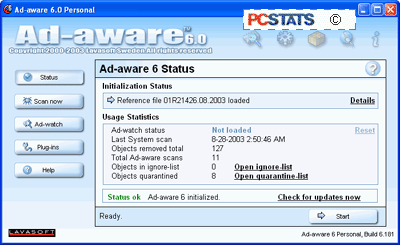
Lavasoft's Ad-Aware is the most well known of these spyware removal tools. Now up to version 6, it works essentially like a virus checker, scanning locations on your computer for the signature files, registry entries and cookies (tracking files) of well-known spyware programs and websites/vendors. It is available both in a free personal edition and as a commercial package for businesses.


It is extremely easy to use, as it employs the familiar one-button scan, one button update mechanism seen in most popular anti-virus packages, and as such will feel familiar to most users. Ad-Aware will categorize files it finds during a scan, and recommend their removal. Ad-Aware is available here.


Credit : http://www.pcstats.com/articleview.cfm?articleid=1458&page=6

Setting Activex Controls

Assuming you are using windows XP and Internet Explorer, there are some browser settings that can be configured to ensure a safer surfing experience, primarily dealing with how activex controls are handled by your browser. Activex controls are essentially programs that can be run by Windows operating systems straight from a web page. These can include many things such as web forms, sound and graphics, but what we are primarily concerned about is installation programs.

Many vendors, such as Gator Corporation, use Activex controls to enable the installation of their software from participating websites. By default, all Windows operating systems will prompt users for permission to install such applications, but it is possible to set your browser to bypass user permission and automatically run Activex controls. To avoid this:

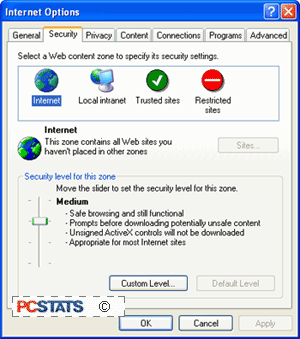
From Internet Explorer, click 'tools' then 'internet options' and select the 'security' tab.

Select the 'custom level' button.

To begin with, ensure that 'download unsigned Active-X controls' and 'initialize and script Active-X controls not marked as safe' are disabled.


Credit : http://www.pcstats.com/articleview.cfm?articleid=1458&page=5

What can you do about spyware?

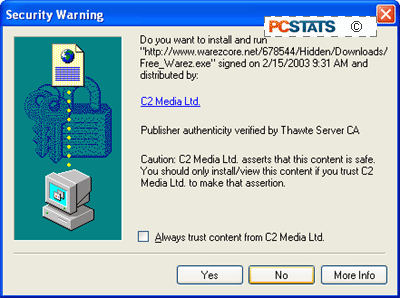
As you have probably realized by now, there are many different ways in which spyware can manifest itself on your computer. In many cases, it may not be at all obvious that your system and your privacy are being compromised. To safeguard yourself against unwanted software, first and foremost read the fine print. The majority of spyware applications attempt to install themselves either from security permission windows such as this one,

or as 'opt-out' components of the installation process of other software. 'Opt-out' meaning that the software will be installed by default, and you must specifically request during the install process that it not be added. Both can be easily avoided if you are diligent about reading screens and licenses before you click 'ok'.


Credit : http://www.pcstats.com/articleview.cfm?articleid=1458&page=4

Varieties of spyware

"Browser hijackers": A very noticeable and annoying type of program that changes your browser homepage setting to one of its choosing, and generally includes a small executable file that will run on start up, ensuring that it keeps coming back. Technically this is not spyware, since it does not generally send any information out, but can be included under the same umbrella term. Browser Hijackers are typically activex control triggered by visiting a specific URL. Some notable hijackers from recent history are xupiter.com and lop.com (and no, we don't recommend you try those links out).

"Scumware/thiefware": Another vague category, (named originally by affected webmasters, see www.scumware.com and www.thiefware.com ) containing the occasional forays made by adware providers into the more potentially lucrative territory of attempting to divert advertising revenue from other websites to themselves, using 'contextual advertising' among other methods.

It hit a peak in 2001-2002, with webmasters decrying the existence of spyware bundled with popular applications like Kazaa, Limewire and Morpheus that could alter the ID tags attached to advertising on a websites, redirecting and effectively stealing the commission. Widespread protest soon curbed this practice, as it did the Gator Corporation's attempt to redirect advertisting revenue by placing its own popup adds directly over the banner ads on websites.

Gator soon reverted to using non-strategically placed ads, and the major Peer to peer file-sharing companies removed or altered the offending software from their products. The current focus of webmasters' ire is companies who market client side 'contextual advertising' software. The idea of this is that the software, once installed, will superimpose its own hyperlinks on top of the text of any website you might be visiting, or place pop-up ad windows overlaying the site window, triggered by the content of the text or the URL you are visiting.

The targets of these links or pop-ups will be companies that advertise through the makers of the software, of course. Essentially, the software is parasitically attaching its own advertising to websites and diluting the advertising revenues they receive. Companies producing contextual advertising software include eZula Inc. (www.ezula.com), WhenU (www.whenu.com) and the Gator corporation (www.gator.com)

Varieties of spyware

Spyware is a blanket term that covers all kinds of generally unhelpful software, from tools that enable companies to deliver ads to you based on your surfing habits, to programs that attempt to hijack your browser settings, all the way to software designed to steal ad-revenue from legitimate online businesses by covering or replacing their adds. Here's a brief guide to some of the categories of nastiness that you may see.

Adware: The most common form of spyware, these are programs which will observe your surfing habits, then report them to one or more servers on the Internet who will then tailor advertising content to your preferences and deliver it to your computer through pop-ups or other methods. Adware is generally bundled in with various freeware applications to help the producers defray the costs, or in some cases, bundled with software produced by the same company, where the license to use the software hinges on the users' acceptance of the adware working in the background. Examples of adware applications include Gator and Doubleclick.

Almost all major peer-to-peer file-sharing programs, such as Kazaa Media Desktop, contain adware. There is a fine line between adware and ad-supported software, and it's generally at the point where you decide the loss of privacy is worth the value of the product you are being offered. In many cases, the products are being marketed towards novice computer users, under the obvious assumption that they will not realize the functionality of the software can be found in other products without unnecessary adware bundled in. This possible exploitation of the unwary, and the idea that some companies involved do not necessarily reveal the extent of the information they are harvesting or the uses to which they intend to put it, tilts the scales.

Be aware that using some of the methods detailed later on to block or remove adware can violate the license agreement of the programs it was included with. This is true in the case of the Gator Corporation's software such as Ewallet and Weatherscope, and also with Kazaa Media Desktop.

Credit : http://www.pcstats.com/articleview.cfm?articleid=1458&page=3

Spyware Vs. Ad-supported software

As a society, we expect advertising. We are used to the idea that advertising provides a source of revenue for businesses that would otherwise find it difficult to charge for their service or content, keeping television, radio and the Internet available and mostly affordable for the average citizen.

Ads have become an essential part of the Internet economy, and will likely stay that way for the foreseeable future. As such, it is important, at least for the health of some sections of the software industry, to make the distinction between spyware and ad-supported software.

Again, as stated in the section above, there are no official or legal definitions of these types of software, but as a generally accepted guideline, ad-supported software can be defined as a freely available product that is funded by advertising.

Of course, this means the entire Internet is essentially ad-supported software, but I digress… ad-supported software products will inform you prior to installation that advertising is part of the provided package, and that information may be transmitted from your computer to aid in targeting these adverts, allowing you to make an informed choice.

Ad-supported software is a major source of revenue for many smaller software companies, and can provide consumers with economical alternatives to costly software. A good example of ad-supported software is the 'sponsored mode' of the popular Eudora mail client. Note the presence of advertising is clearly stated.

Ad-supported software can be an excellent way for small companies to market their products provided they are upfront with their methods. The point at which spyware branches off from ad-supported software is when the software does not clearly state its intended purpose.

Credit : http://www.pcstats.com/articleview.cfm?articleid=1458&page=3

Thursday, February 15, 2007

Protect Yourself From Spyware

5 Easy Steps To Help You

If its not one thing, its another. That is one of those ridiculous phrases that pretty much goes without saying. Like "wherever you go, there you are." But, in this case it seems appropriate.

Allow me to elaborate. Computers on the Internet are almost constantly bombarded with viruses and other malware- so users employ antivirus software to protect themselves. Email inboxes are constantly flooded with pathetically useless spam- so users employ anti-spam programs and techniques to protect themselves. As soon as you think you have things under control you find out your system has a myriad of spyware and adware programs silently running in the background monitoring and reporting on your computer activity. Hence, "if its not one thing, its another."

The more benign spyware and adware simply monitors and tracks your the sites you visit on the web so that companies can determine the web-surfing habits of their users and try to pinpoint their marketing efforts. However, many forms of spyware go beyond simple tracking and actually monitor keystrokes and capture passwords and other functions which cross the line and pose a definite security risk.

How can you protect yourself from these insidious little programs? Ironically, many users unwittingly agree to install these programs. In fact, removing some spyware and adware might render some freeware or shareware programs useless. Below are 5 easy steps you can follow to try to avoid and, if not avoid, at least detect and remove these programs from your computer system:

  1. Be Careful Where You Download: Unscrupulous programs often come from unscrupulous sites. If you are looking for a freeware or shareware program for a specific purpose try searching reputable sites like tucows.com or download.com.
  2. Read the EULA: What is an EULA you ask? End User License Agreement. It's all of the technical and legal gibberish in that box above the radio buttons that say "No, I do not accept" or "Yes, I have read and accept these terms". Most people consider this a nuisance and click on "yes" without having read a word. The EULA is a legal agreement you are making with the software vendor. Without reading it you may be unwittingly agreeing to install spyware or a variety of other questionable actions that may not be worth it to you. Sometimes the better answer is "No, I do not accept."
  3. Read Before You Click: Sometimes when you visit a web site a text box might pop up. Like the EULA, many users simply consider these a nuisance and will just click away to make the box disappear. Users will click "yes" or "ok" without stopping to see that the box said "would you like to install our spyware program?" Ok, admittedly they don't generally come out and say it that directly, but that is all the more reason you should stop to read those messages before you click "ok".
  4. Protect Your System: Antivirus software is somewhat misnamed these days. Viruses are but a small part of the malicious code these programs protect you from. Antivirus has expanded to include worms, trojans, vulnerability exploits, jokes and hoaxes and even spyware and adware. If your antivirus product doesn't detect and block spyware you can try a product like AdAware Pro which will protect your system from spyware or adware in real time.
  5. Scan Your System: Even with antivirus software, firewalls and other protective measures some spyware or adware may eventually make it through to your system. While a product like AdAware Pro mentioned in step #4 will monitor your system in real time to protect it, AdAware Pro costs money. The makers of AdAware Pro, Lavasoft, also have a version available for free for personal use. AdAware will not monitor in real time, but you can manually scan your system periodically to detect and remove any spyware. Another excellent choice is Spybot Search & Destroy which is also available for free.

If you follow these five steps you can keep your system protected from spyware proactively and detect and remove any that does manage to get into your system. Good luck!

Credit : From Tony Bradley, CISSP-ISSAP,

What Types of Spyware are Out There

By Brian VanNess and Joanne C. Weaver

Spyware is any software that obtains information from a PC without the user’s knowledge. There are many different types of spyware operating on the Internet but you can generally group them into two categories:

Domestic Spyware and Commercial Spyware.Domestic Spyware is software that is usually purchased and installed by computer owners to monitor the Internet behavior on their computer networks. Employers use this software to monitor employee online activities; some family members use domestic spyware to monitor other family members (such as reviewing the content of children’s chat room sessions).A third party can also install domestic spyware without the knowledge of the computer owner. Law enforcement officials have used domestic spyware to monitor suspected criminal activity and criminals have used domestic spyware to siphon personal information from private computers in order to steal assets.

Commercial Spyware (also known as adware) is software that companies use to track your Internet browsing activities. Companies that track your online habits often sell this information to marketers who then hit you with targeted advertising—ads that match your browsing interests and would most likely appeal to you.

Advertisers are delighted when they acquire such valuable marketing information so easily; in the past marketers had to bribe you to learn your preferences through contests, registration surveys and the like. Those methods of gaining your personal information still exist, but in those cases you have the power to read the fine print to learn the fate of your data and so could choose to consent or refuse. Gaining your preferences by stealth using software spies is far easier and offers a much more complete picture for the marketing industry; as a result, spyware is everywhere. For more information on how and when spyware attaches itself to your computer, read How Did Spyware End Up on My Computer?

At the very least, spyware is a nuisance—slowing down your computer, filling your hard drive with useless gunk and marking you as a target for enterprising advertisers. Beyond intruding on your privacy, spyware can be used as a tool to perpetuate crimes, such as identify fraud. Below is a list detailing different types of spyware and the purposes for each.

Internet URL loggers & screen recordersURL loggers track websites and pages visited online; screen recorders can take a small grayscale snapshot image of your screen every time it changes and can store or transmit these without notifying you. These methods are common to Domestic spyware.

Chat loggers & email recordersEmail recorders and chat loggers are similar, making a text copy of all incoming and outgoing email and chat sessions. Domestic spyware frequently utilizes these methods.

Keyloggers & password recordersWhen
you bank online with this software on your hard drive someone is looking over your shoulder. Password recorders do just that—track typed passwords. Keylogger software records all of your keystrokes, not just passwords.

Web bugs
Web bugs are also known as advertiser spyware or adware. When you have adware on your computer you receive targeted, popup ads after you perform some action, such as typing something into a search engine. This advertising can even appear on your screen even when you are not online. If you are pummeled with new advertising screens constantly, you most likely have web bug spyware installed on your computer.

Browser hijacking
Browser hijackers place Internet shortcuts on your Favorites Folder without prompting you. This shortcut will lead many accidental viewers to their website so that they may artificially inflate their website's traffic stats; this enables them to receive higher advertising revenues at the expense of your time. You may be able to get rid of these false favorites by changing your Internet options, but occasionally the only way to get rid of these annoying shortcuts is to go into your registry and delete them. However, some spyware installs a safety net for itself that resets the spyware on your registry each time you reboot. Your only option to kill this aggressive type of spyware is to reformat your hard drive or to utilize an excellent anti-spyware program.

Modem hijacking
If you use a telephone modem for your Internet connection, an unscrupulous person may be able to install an online dialer on your computer to establish a new Internet connection that uses pricy 900-type long-distance phone numbers—quite a shock when you get your next telephone bill. These dialer spyware programs often piggy-back on spam and porn emails; simply opening the email can inadvertently initiate the dialer installation. The hard-to-track villain banks on the fact that you’ll pay your phone bill in full before you take time to figure out what happened.

PC hijacking
Some borrow your computer system for their own use—spyware users can hijack your connection to send their spam through your ISP. This means that a parasitical spammer can send thousands of spam emails through your computer connection and your ISP address. High-volume, high speed Internet access lines are targeted by users of this spyware. Often victims don’t realize that their good name has been muddied until their ISP cuts them off due to spam complaints.

Trojans & viruses
Like the wooden Trojan horse that the Greeks used to enter Troy, this spyware masquerades as a something harmless yet can compromise your computer—your data may be copied, distributed or destroyed. A virus is similar but has the additional power to replicate itself, causing damage to multiple computers. Both of these vicious pieces of software fall under the definition of spyware because the user is unaware of and would not condone their true purpose.

What makes a great Anti-Spyware solution?

Below we highlighted the attributes that we at Anti-Spyware Software Review consider to be the most important when purchasing spyware and adware detection and removal software.

  • Feature Set – Does the anti-spyware include tools to enhance the ease of spyware detection and removal? Does the software offer descriptions of detected spyware so you can determine whether or not you want to keep each item? Are there auto-update and auto-scheduling capabilities available to save you time and keep you up-to-date and protected? Are there "undo" capabilities in case you accidentally delete something you actually need?

  • Effectiveness– Does the product provide real-time protection from spyware—preventing its installation instead of just removing it afterward? Is the product effective at finding and removing the many different types of spyware and adware? Does the manufacturer keep their product up-to-date with new spyware definitions?

  • Ease of Use – How easy is the product to use? Can you quickly find the features you are looking for? Are the descriptions easily understood or do they assume you know all the appropriate jargon? How quickly does the software perform the scan?

  • Customization – Can you target select portions of your computer to save on scanning time? Are there other options available to accommodate different needs, such as opting out of removal of certain items, or scanning to remove spyware that alters your Internet settings?

  • Ease of Setup / Installation – Is it easy to download and install the product? Can you get it up and running without consulting a book or a tech support person?

  • Help / Support – Is there a Help section installed with the product? Is it easy to find answers to your questions? Is there someone you can call for support? How quickly does the support staff respond to your email questions?
    With the right solution for removing and detecting spyware in place, you can keep your computer privacy protected and your PC ad-free.

Anti Spyware 2007 review click here : http://anti-spyware-review.toptenreviews.com/

Wednesday, February 14, 2007

SpyFalcon Removal Instructions

SpyFalcon General Description

SpyFalcon is a rogue anti-spyware application. SpyFalcon may appear as an icon in your Windows tray and show a message that says your PC is infected with malware. SpyFalcon may then suggest you download and install software to remove this malware. If you follow its directions, you will download SpyFalcon, and once downloaded SpyFalcon may redirect your Internet Explorer home page and search results to a malicious website. SpyFalcon may also download and install other software without your permission. SpyFalcon may be distributed through bundles of trojans and other malware.

Remove "SpyFalcon"

Automatically:Download SpyFalcon removal software.

How can I get rid of "SpyFalcon"?

Your best defense to remove SpyFalcon, or any other spyware, is to quickly detect and delete SpyFalcon processes, registry keys, DLL files, and other hazardous SpyFalcon files from your computer. Click here to manually uninstall SpyFalcon using "Add/Remove Programs" in your PC.

Remove SpyFalcon Manually

Note: This manual removal process is difficult and you run the risk of destroying your computer. We recommend that you use the automatic removal process.

Remove SpyFalcon processes:

dfrgsrv.exemscornet.exe mssearchnet.exenvctrl.exespyfalcon.exeuninst.exe

Remove SpyFalcon registry values:

HKEY_LOCAL_MACHINESOFTWAREMicrosoftWindowsCurrentVersionRunSpyFalconD1A2E7CD-F5C1-21A8-CA2C-13D0AC72D19D244B730E-D899-4E38-9428-03D1143242E0

HKEY_LOCAL_MACHINESOFTWAREMicrosoftWindowsCurrentVersionAppManagementARPCacheSpyFalcon

HKEY_LOCAL_MACHINESOFTWAREMicrosoftWindowsCurrentVersionUninstallSpyFalconcbb430e6-5b1b-474a-9d7e-160d4fe74bea

SOFTWARE\Microsoft\Windows\CurrentVersion\Explorer\SharedTaskScheduler\cbb430e6-5b1b-474a-9d7e-160d4fe74bea

SOFTWARE\Microsoft\Windows\CurrentVersion\Explorer\SharedTaskScheduler\6c69e319-0d03-47da-997a-36586cbc53b3

SOFTWARE\Microsoft\Windows\CurrentVersion\Explorer\SharedTaskScheduler\89aef01d-d237-49c7-84dc-4e1904c1fd31

SOFTWARE\Microsoft\Windows\CurrentVersion\Explorer\SharedTaskScheduler\24c60b9b-26b5-4201-9f7a-fb9219356ae9

SOFTWARE\Microsoft\Windows\CurrentVersion\Explorer\SharedTaskScheduler\336ec37f-54bf-4f13-8237-03f64fa591e7

SOFTWARE\Microsoft\Windows\CurrentVersion\Explorer\SharedTaskScheduler\0c7416f0-dd23-420f-97f5-aae352ea2bf1

SOFTWARE\Microsoft\Windows\CurrentVersion\Explorer\SharedTaskScheduler\35a88e51-b53d-43e9-b8a7-75d4c31b4676a0c51615-738a-4542-801a-5af61614e182f5947202-e9cb-4a72-88e7-22f2cbd2b1246c69e319-0d03-47da-997a-36586cbc53b389aef01d-d237-49c7-84dc-4e1904c1fd3124c60b9b-26b5-4201-9f7a-fb9219356ae9336ec37f-54bf-4f13-8237-03f64fa591e70c7416f0-dd23-420f-97f5-aae352ea2bf135a88e51-b53d-43e9-b8a7-75d4c31b4676

Unregister SpyFalcon DLL

files:dxmpp.dllginuerep.dlloqipt.dlliqzv.dllhtey.dllulztc.dlloerucu.dllsbnudh.dllfyhhxw.dllappmagr.dllreglogs.dlltwain32.dllhigjxe.dllbolnyz.dllwfkduei.dllwinrge32.dll

Detect and Delete these SpyFalcon files:

dfrgsrv.exe

mscornet.exe ms

searchnet.exe

nvctrl.exe

spyfalcon.exe

uninst.exe

dxmpp.dll

ginuerep.dll

oqipt.dll

iqzv.dll

htey.dll

ulztc.dll

oerucu.dll

sbnudh.dll

fyhhxw.dll

appmagr.dll

reglogs.dll

twain32.dll

ldX].tmp

syg.db

spyfalcon.url

blacklist.txt

english.ini

spyfalcon2.0.lnk

uninstallspyfalcon2.0.lnk

spyfalcon2.0website.lnk

spyfalcon.lnk

SpyFalconhigjxe.dll

bolnyz.dll

wfkduei.dll

winrge32.dll

Our Recommendation:

To avoid the unnecessary risk of damaging your computer, we highly recommend you use a good spyware cleaner/remover to track SpyFalcon and automatically find and remove other spyware, adware, trojans, and viruses in your PC.

SpyFalcon Automatic Remover:Download SpyFalcon remover software.

Credit : http://www.spywareremove.com/removeSpyFalcon.html
Adware Description:

Adware usually acts without your authorization or knowledge. Many free utilities may install hidden software, possibly to earn money for the author to recover development costs. While adware is not always malicious, it typically tracks your Internet activity and sends other information from your computer (which can include email addresses) to advertisers. With this information, you may now be a target for pop-up/pop-under advertisements, additional toolbars, and spam.

Is your PC infected with Adware?
Check for these Adware symptoms on your PC or click here for automatic check.
  • Slow PC performance. Having even as few as one or two types of Adware can clog your bandwidth causing sluggish computer performance. Because types of Adware secretly operate in the background, you won't be able to easily detect them. Noticeable problems like computer taking long periods to turn on or a slow Internet connection - are signs that your computer may have Adware.

  • New desktop shortcuts or homepage. Adware may add new desktop shortcuts or even change your settings to redirect your default homepage to point to another site. If you want your computer to be spyware-free, you must remove all traces of Adware.

  • Bombarded with annoying popups. Adware may bombard your computer with popup ads. Adware may prevent regular Internet activity and even track your surfing habits as well as your personal information. Remove Adware immediately because the more traces of Adware you have the more popups you'll see on your computer.

Credit : http://www.spywareremove.com/remove-Adware/index.html